# Web administration
Version: 1.32-stable
There are three primary ways of managing Halon Engage & Protect;
the web administration, API ([Protocol Buffer](https://docs.halon.io/protobuf-schemas/)) or [CLI](https://docs.halon.io/manual/cli.html).
This manual is a guide for the web administration.
## Table of contents
* [Installation](#install)
* [Distributions](#install:distributions)
* [Ubuntu](#install:ubuntu)
* [RHEL](#install:rhel)
* [Startup](#install:startup)
* [Upgrade](#upgrade)
* [Configuration](#config)
* [Listener directives](#config:listener-directives)
* [Host directives](#config:host-directives)
* [Group directives](#config:group-directives)
* [User directives](#config:user-directives)
* [OIDC directives](#config:oidc-directives)
* [MCP directives](#config:mcp-directives)
* [Database directives](#config:database-directives)
* [Elasticsearch directives](#config:elasticsearch-directives)
* [Other directives](#config:other-directives)
* [Environment directives](#config:environment-directives)
* [History logging](#history)
* [Install Elasticsearch](#history:install-elasticsearch)
* [Import an index template](#history:import-an-index-template)
* [Delivery attempts](#history:delivery-attempts)
* [Transactions](#history:transactions)
* [Add configuration](#history:add-configuration)
* [History datamasking](#history:history-datamasking)
* [Start sending data](#history:start-sending-data)
* [Tips on usage](#tips)
* [Saving views persistently](#tips:saving-views-persistently)
* [Sharing views with other users](#tips:sharing-views-with-other-users)
* [Display of hostnames](#tips:display-of-hostnames)
* [!Env - using environment variables](#tips:env-using-environment-variables)
* [Changelog](#changelog)
# Installation
The web administration is installed using a Linux distribution package manager
according to the corresponding instructions, or by manually copying the files to the
`/opt/halon/web` directory.
## Distributions
### Ubuntu
To install the .deb package use the following commands.
```console
# apt-get update
# apt-get install halon-web
```
### RHEL
To install the .rpm package use the following commands.
```console
# yum install halon-web
```
## Startup
When the initial [configuration](#config) is in place, the program can be started with:
```console
# systemctl start halon-web
```
# Upgrade
In order to upgrade the package, install the new package over the previous installed one (see the installation chapter).
After the upgrade the service will be stopped and requires to be manually started.
# Configuration
*halon-web* loads the non-reloadable configuration from `/etc/halon/web.yaml`.
It is described by, and can be validated with, the
[web.schema.json](http://lbovet.github.io/docson/index.html#https://docs.halon.io/json-schemas/web/1.32-stable/web.schema.json)
[JSON schema](https://docs.halon.io/json-schemas/web/1.32-stable/) (included in our [Visual Studio Code integration](https://docs.halon.io/manual/vscode.html)).
The default startup configuration file in `/opt/halon/web/share` can normally be used as a base:
```console
# cp /opt/halon/web/share/web.yaml /etc/halon/
```
## Listener directives
### listeners[]
The web administration must have one or more listen directives,
which specify which TCP port and address to listen on. **Required.**
### listeners[].port
Which TCP port to listen on. **Required.**
### listeners[].baseurl
An optional public base URL (scheme, host and optional port, e.g. [https://web.example.com](https://web.example.com)).
### listeners[].basepath
An optional URL path prefix under which the web administration is served, for example /web.
### listeners[].address
IPv4 or IPv6 address to listen on.
The default is to listen to all IPv4 and IPv6 addresses.
### listeners[].tls
TLS settings for the listener.
### listeners[].tls.pki
The X.509 certificate and private key.
The private key and certificate should have either a `path` or `data` property.
```yaml
pki:
certificate:
data: |-
-----BEGIN CERTIFICATE-----
...
privatekey:
data: |-
-----BEGIN PRIVATE KEY-----
...
```
### listeners[].tls.ciphers
Cipher suite specification
### listeners[].tls.protocols.min
Minimum TLS version to allow
### listeners[].tls.protocols.max
Maximum TLS version to allow
### listeners[].proxy.trust
Can either be a boolean or a list of IP addresses and subnets to trust as being reverse proxies.
If it’s a boolean and it’s set to *true* it will trust all IP-addresses and subnets as being reverse proxies.
> ```yaml
> listeners:
> - proxy:
> trust:
> - 1.2.3.4
> ...
> ```
### listeners[].proxy.userheader
This setting allows for automatic login when behind a reverse proxy.
If configured, this header should be set by the reverse proxy and contain the username for the session.
> ```yaml
> listeners:
> - proxy:
> userheader: X-Proxy-User
> ...
> ```
### listeners[].proxy.groupheader
When logging in via reverse proxy. This header is set to assign group permissions for the user.
## Host directives
### hosts[]
The web administration must have one or more host directives,
which specify which [HTTP/JSON endpoints](https://docs.halon.io/manual/api_http_json.html) to connect to. **Required.**
### hosts[].port
Which TCP port to connect to. **Required.**
### hosts[].address
Hostname, IPv4 address or IPv6 address to connect to. **Required.**
### hosts[].name
The display name. The default is the address. Cannot be combined with the *expand* option.
### hosts[].expand
Add all IP addresses for the hostname as unique hosts. The default is *false*. Mutually exclusive with [`hosts[].kubernetes`](#config:confval-hosts-.kubernetes).
### hosts[].kubernetes
The Kubernetes settings. Mutually exclusive with [`hosts[].expand`](#config:confval-hosts-.expand).
### hosts[].kubernetes.namespace
The namespace for the smtpd *StatefulSet\`*.
### hosts[].kubernetes.name
The name for the smtpd *StatefulSet*.
### hosts[].kubernetes.address
How to address each pod: *ip* (default, e.g. *10.42.0.12*), *hostname* (e.g. *halon-smtpd-0.halon-smtpd.default*), or *ip-hostname* (e.g. *10-42-0-12.halon-smtpd.default*).
DNS names use the pod’s subdomain and namespace. Resolution requires a matching service endpoint record. CoreDNS uses an endpoint’s hostname when set; the dashed IP is a fallback for unnamed endpoints, so the two DNS forms are not interchangeable.
### hosts[].kubernetes.clusterdomain
The cluster DNS domain, e.g. *cluster.local*, used by the DNS address modes. A non-empty value appends *.svc.\*; otherwise the resolver must supply that suffix through its DNS search list.
### hosts[].tls.enabled
If TLS should be used for the requests. The default is *false*.
### hosts[].tls.verify
If the server certificate should be verified. The default is *true*.
### hosts[].tls.verifyname
Hostname to verify against the server certificate’s CN and SAN.
### hosts[].secret
The secret that will be sent in the requests using the *X-API-Key* header.
### hosts[].processes[]
The processes that are running on the host. The default is *smtpd* and *rated*.
### hosts[].timeout
The timeout against the node (in seconds). The default is *5*.
### reresolve
Automatically re-resolve the hostnames of the hosts every *x* seconds.
## Group directives
### groups[]
You can set up groups to easily manage permissions instead of setting them on each user.
Groups can also be used when logging in via reverse proxy.
### groups[].name
The name of the group **Required**
### groups[].features.preview.enabled
If the user should be able to preview messages. The default is *true*.
### groups[].features.readonly
If the user should only have readonly access. The default is *false*.
### groups[].features.writable
If *group[].features.readonly* is set to *true* you can set an array of commands that the group should be able to execute.
### groups[].features.memory.enabled
If the user should be able to view the memory page. The default is *true*.
### groups[].features.rates.enabled
If the user should be able to view the rates page. The default is *true*.
### groups[].features.datamasking
Configure the group datamasking settings
> **Note**
>
> Enabling `localpart`, `subject`, `retryreason`, or `saslusername` masking also disables [`groups[].features.preview.enabled`](#config:confval-groups-.features.preview.enabled)
> **Warning**
>
> The `localpart`, `subject`, `retryreason`, and `saslusername` settings do not apply for the [history feature](#history).
> Use the `history` datamasking setting to hide history source paths in the web administration.
> To redact data in the stored history logs, use the `redact` option in the [history-elastic](https://github.com/halon-extras/history-elastic) plugin.
### groups[].features.datamasking.localpart
If the *localpart* of a mail should be masked for the user. The default is *false*
### groups[].features.datamasking.subject
If the *subject* of a mail should be masked for the user. The default is *false*
### groups[].features.datamasking.retryreason
If the *retryreason* of a mail should be masked for the user. The default is *false*
### groups[].features.datamasking.saslusername
If the *salusername* of a mail should be masked for the user. The default is *false*
### groups[].features.datamasking.history
History source paths to hide and disallow in queries. True masks the path and its descendants.
The timestamp and transaction identifier are reserved. Charts that read or filter on masked paths are hidden.
The following example uses the [delivery-attempts](#history:history-delivery-attempts) index template:
```yaml
datamasking:
history:
sender: true
senderlocalpart: true
recipient: true
recipientlocalpart: true
smtpreasonnormalized: true
smtpreason: true
```
## User directives
### users[]
The web administration must have one or more user directives,
which specify which users can log in to the web administration. **Required.**
### users[].username
The username. **Required.**
### users[].password
The password.
> **Note**
>
> The password needs to be encrypted using bcrypt. You can run the following command to generate a password:
>
> ```console
> $ /opt/halon/web/bin/generatepass
> ```
### users[].group
The group the user should be assigned to.
### users[].features.preview.enabled
If the user should be able to preview messages. The default is *true*.
### users[].features.readonly
If the user should only have readonly access. The default is *false*.
### users[].features.writable
If *users[].features.readonly* is set to *true* you can set an array of commands that the user should be able to execute.
### users[].features.memory.enabled
If the user should be able to view the memory page. The default is *true*.
### users[].features.rates.enabled
If the user should be able to view the rates page. The default is *true*.
### users[].features.datamasking
Configure the users datamasking settings
> **Note**
>
> Enabling `localpart`, `subject`, `retryreason`, or `saslusername` masking also disables [`users[].features.preview.enabled`](#config:confval-users-.features.preview.enabled)
> **Warning**
>
> The `localpart`, `subject`, `retryreason`, and `saslusername` settings do not apply for the [history feature](#history).
> Use the `history` datamasking setting to hide history source paths in the web administration.
> To redact data in the stored history logs, use the `redact` option in the [history-elastic](https://github.com/halon-extras/history-elastic) plugin.
### users[].features.datamasking.localpart
If the *localpart* of a mail should be masked for the user. The default is *false*
### users[].features.datamasking.subject
If the *subject* of a mail should be masked for the user. The default is *false*
### users[].features.datamasking.retryreason
If the *retryreason* of a mail should be masked for the user. The default is *false*
### users[].features.datamasking.saslusername
If the *salusername* of a mail should be masked for the user. The default is *false*
### users[].features.datamasking.history
History source paths to hide and disallow in queries. True masks the path and its descendants.
The timestamp and transaction identifier are reserved. Charts that read or filter on masked paths are hidden.
The following example uses the [delivery-attempts](#history:history-delivery-attempts) index template:
```yaml
datamasking:
history:
senderlocalpart: true
recipientlocalpart: true
smtpreason: true
smtpreasonnormalized: true
```
## OIDC directives
### oidc
OpenID Connect (OIDC) settings. This is an object with two required fields: `enabled` and `provider`.
### oidc.enabled
If OIDC should be enabled. **Required.**
### oidc.provider
The OIDC provider configuration object. **Required.**
The provider must contain the unique provider ID, discovery URL, client ID and client secret.
### oidc.provider.providerid
The unique provider ID. **Required.**
### oidc.provider.discoveryurl
The OIDC discovery URL. **Required.**
### oidc.provider.clientid
The OIDC client ID. **Required.**
### oidc.provider.clientsecret
The OIDC client secret. **Required.**
### oidc.provider.pkce
If PKCE should be used. The default is `true`.
### oidc.provider.groupclaim
The claim containing the user’s group(s). Values from this claim are matched against configured groups in the YAML config.
If this option is set, [`oidc.provider.allowedgroups[]`](#config:confval-oidc.provider.allowedgroups) becomes required.
### oidc.provider.allowedgroups[]
List of allowed config group names that OIDC users may belong to. Each entry is a non-empty string.
This option is required when [`oidc.provider.groupclaim`](#config:confval-oidc.provider.groupclaim) is set and must not be present otherwise.
### oidc.provider.displayname
The display name for the provider.
### oidc.provider.displayicon
An icon for the provider. Two alternatives supported:
- Inline data + extension:
```yaml
displayicon:
data: |-
iVBORw0KGgoAAAANSUhEUg...
extension: .png
```
- Path to file + extension (optional):
```yaml
displayicon:
path: /opt/halon/web/share/icons/myprovider.svg
```
Supported extensions are `.png` and `.svg`.
## MCP directives
A MCP server that provides tools to interact with Halon hosts and their processes.
> **Important**
>
> When [`mcp.enabled`](#config:confval-mcp.enabled) is *true*, every listener must have a [`listeners[].baseurl`](#config:confval-listeners-.baseurl).
>
> When both MCP and OAuth are enabled, the following requirements also apply:
>
> * [`database`](#config:confval-database) must be configured.
> * [`environment.session.secret`](#config:confval-environment.session.secret) must be configured.
> * A custom [`listeners[].basepath`](#config:confval-listeners-.basepath) is not supported.
> * Every listener’s [`listeners[].baseurl`](#config:confval-listeners-.baseurl) must use HTTPS, except for loopback hosts: `localhost` or `[::1]`.
>
> Use [`users[].features.datamasking`](#config:confval-users-.features.datamasking) or [`groups[].features.datamasking`](#config:confval-groups-.features.datamasking) to hide sensitive data from the LLM when using MCP.
### mcp.enabled
If the MCP endpoint should be enabled. The default is *false*.
The MCP endpoint will be available at `https:///mcp`.
### mcp.oauth.enabled
If OAuth should be enabled for the MCP endpoint. The default is *true*.
The MCP client inherits the permissions of the user who signed in.
> **Warning**
>
> Disabling OAuth means no authentication is required to access the MCP endpoint.
> Only disable it in a trusted environment or when behind an MCP gateway.
### mcp.oauth.accesstoken.expiresin
How long an MCP access token is valid (in seconds). Clients refresh it when it expires.
The default is *3600*.
### mcp.oauth.refreshtoken.expiresin
How long an MCP client stays signed in without being used (in seconds). Each token refresh starts the period again.
The default is *2592000*.
## Database directives
### database
The database settings ([knex](https://knexjs.org/guide/#configuration-options)) for storing per-user settings.
> **Note**
>
> A SQLite3 example would look like this. In this example make sure the `/var/lib/halon/web` folder is writeable by the
> [`environment.privdrop.user`](#config:confval-environment.privdrop.user) or [`environment.privdrop.group`](#config:confval-environment.privdrop.group).
>
> > ```yaml
> > database:
> > client: sqlite3
> > connection:
> > filename: /var/lib/halon/web/web.sqlite
> > ```
### database.client
The included client drivers are *sqlite3*, *pg* and *mysql*.
### database.connection
The client driver connection string or object. See [knex manual](https://knexjs.org/guide/#configuration-options) for specifics of each database driver.
## Elasticsearch directives
This enables the [history feature](#history) in the web administration.
### elasticsearch
The settings for Elasticsearch.
### elasticsearch.index.history
The index pattern for the history logs.
### elasticsearch.index.policyd
The index pattern for the policyd logs.
### elasticsearch.nodes[]
A list of Elasticsearch nodes.
### elasticsearch.nodes[].url
The Elasticsearch URL to connect to.
### elasticsearch.auth
Specify any credentials for authentication.
### elasticsearch.auth.username
The username for basic authentication.
### elasticsearch.auth.password
The password for basic authentication.
### elasticsearch.tls
TLS settings ([Node.js](https://nodejs.org/api/tls.html)).
## Other directives
### instance
The name that will be shown in the document title.
### solution
The solution, can be either *engage* or *protect*.
### accounting
If accounting logs should be generated. The default is *false*.
### maxmind.geoip.path
The directory to MaxMind’s GeoIP database. The default is */var/lib/GeoIP/GeoLite2-Country.mmdb*.
### policyd.port
The port for the `policyd` service.
### policyd.address
The address for the `policyd` service.
### policyd.tls.enabled
If TLS should be used for the requests. The default is *false*.
### policyd.tls.verify
If the server certificate should be verified. The default is *true*.
### policyd.secret
The secret that will be sent in the requests using the *X-API-Key* header.
### trustedorigins[]
A list of trusted origins. This list should only contain domains or wildcard domains (eg. `*.example.com`).
## Environment directives
### environment.privdrop.user
The user to run the process as.
### environment.privdrop.group
The group to run the process as.
> **Tip**
>
> The `privdrop.user` and `privdrop.group` settings to use will depend on your Linux distribution:
>
> * For Ubuntu, suitable values are `nobody` and `nogroup`
> * For RHEL and related distibutions, the values are `nobody` and `nobody`.
### environment.session.secret
> The secret used for encryption, signing, and hashing.
> The default is to generate a unique UUID during startup.
> **Note**
>
> The minimum length is 32 characters.
### environment.session.secure
> If secure cookies should be used. The default is `true` if [`listeners[].tls.pki`](#config:confval-listeners-.tls.pki) is configured, otherwise *false*.
> **Note**
>
> It’s recommended to set this to *true* when doing SSL termination at a reverse proxy.
# History logging
To enable history logging there are some steps that need to be completed which are outlined below.
## Install Elasticsearch
Elastic has an article on installing Elasticsearch [here](https://www.elastic.co/guide/en/elasticsearch/reference/current/install-elasticsearch.html).
## Import an index template
Import one of the index templates below ([Delivery attempts]() **or** [Transactions]()) into Elasticsearch. The differences between these index templates are described in each section.
### Delivery attempts
This template will log all delivery attempts and the same message may appear multiple times, once for each delivery attempt.
For this template you should set the value for `elasticsearch.index` to `halon-delivery-attempts` in the `web.yaml` file.
> ```console
> curl -k -X PUT -H "Content-Type: application/json" -d @/opt/halon/web/share/history/elasticsearch/delivery-attempts/halon_timeseries_policy.json http://elastic:elastic@127.0.0.1:9200/_ilm/policy/halon-timeseries-policy
> curl -k -X PUT -H "Content-Type: application/json" -d @/opt/halon/web/share/history/elasticsearch/delivery-attempts/halon_delivery_attempts.json http://elastic:elastic@127.0.0.1:9200/_index_template/halon-delivery-attempts
> ```
### Transactions
This template will log all transactions and update the state for them instead of creating a new log entry after each delivery attempt.
For this template you should set the value for `elasticsearch.index` to `halon-transactions-*` in the `web.yaml` file.
> ```console
> curl -k -X PUT -H "Content-Type: application/json" -d @/opt/halon/web/share/history/elasticsearch/transactions/halon_transactions_policy.json http://elastic:elastic@127.0.0.1:9200/_ilm/policy/halon-transactions-policy
> curl -k -X PUT -H "Content-Type: application/json" -d @/opt/halon/web/share/history/elasticsearch/transactions/halon_transactions.json http://elastic:elastic@127.0.0.1:9200/_index_template/halon-transactions
> ```
## Add configuration
The [history feature](#history) **requires** an additional configuration file.
This configuration file is used to define fields in Elasticsearch and how they should be rendered.
*halon-web* loads the non-reloadable configuration from `/etc/halon/web-history.yaml`.
It is described by, and can be validated with, the [web-history.schema.json](http://lbovet.github.io/docson/index.html#https://docs.halon.io/json-schemas/web/1.32-stable/web-history.schema.json) JSON schema.
The default startup configuration file in `/opt/halon/web/share` can normally be used as a base (only choose one of them):
The following configuration is based on the Elasticsearch index template called **halon-delivery-attempts**:
```console
# cp /opt/halon/web/share/history/delivery-attempts.yaml /etc/halon/web-history.yaml
```
The following configuration is based on the Elasticsearch index template called **halon-transactions**:
```console
# cp /opt/halon/web/share/history/transactions.yaml /etc/halon/web-history.yaml
```
Use the [`elasticsearch`](#config:confval-elasticsearch) directives to enable history logging in the web administration.
Sample *web.yaml* config using the [Delivery attempts]() template:
```yaml
elasticsearch:
index: 'halon-delivery-attempts'
nodes:
- url: http://127.0.0.1:9200
auth:
username: elastic
password: elastic
tls:
rejectUnauthorized: false
```
## History datamasking
To hide history source paths and disallow them in queries for specific users or groups, use
[`users[].features.datamasking.history`](#config:confval-users-.features.datamasking.history) or [`groups[].features.datamasking.history`](#config:confval-groups-.features.datamasking.history).
## Start sending data
To start sending data to Elasticsearch from the *smtpd* process using [HSL](https://docs.halon.io/hsl/) you can use the [history-elastic](https://github.com/halon-extras/history-elastic) plugin (supports both index templates).
# Tips on usage
## Saving views persistently
By default, saved views are stored in browser local storage, meaning they exist only in your current browser on your current device.
They do not sync between browsers or devices.
To make saved views available across different browsers or devices, configure the [Database directives](#config:database-directives) so the views are stored on the server instead.
Note that they are specific to the user that created them.
### Sharing views with other users
You can share views with other users. Under Views / Manage Views, select the arrow button. Confirm your choice.
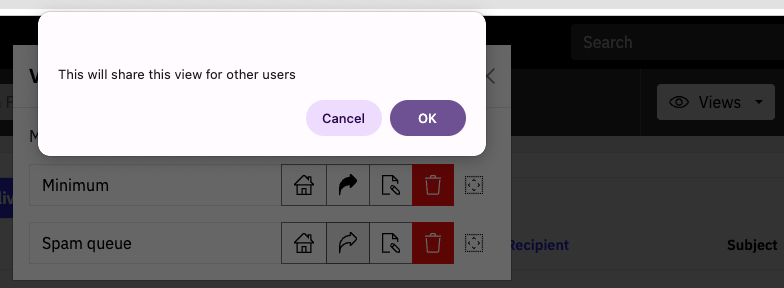
Views can be “unshared” afterwards in the same way.
## Display of hostnames
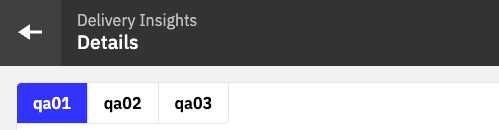
In the Overview screen and also in tabbed views, the interface presents the `hostname` from the operating system of each instance.

If no hostname is set, the IP address is shown.
You can change this behavior by setting the [`hosts[].name`](#config:confval-hosts-.name) property.
This helps when working with clusters of many instances, or with long hostnames.
For example, the above system could be presented as:
## !Env - using environment variables
Key / value pairs can be injected into environment variables which can then be used in the YAML config file.
The `!Env` functionality is not enabled by default so needs to be set when the process is started. For example, for Docker, the web image file needs to change to include the configuration setting
```console
CMD [ "/opt/halon/node/bin/node", "/opt/halon/web/dist/bin/server.js", "--config-env-substitution" ]
```
Variables can then be used in configuration files as per this example
```yaml
users:
- username: admin
password: !Env ${HALON_PASSWORD_WEB}
```
The config can include a default value that would be used if the environment variable is empty. For example
```yaml
username: !Env ${HALON_USERNAME_WEB:admin}
```
Any fields can be set using variables, but since fields environment variables are set as strings, they need to be cast if the values are intended to not to be strings (eg booleans and numbers).
For instance, to set the port number would need this syntax (showing port 2525 as the default value).
```yaml
port: !Env tag:yaml.org,2002:int ${PORT:2525}
```
Options for different cast values are at [yaml.org](https://yaml.org/spec/1.2.1/#id2803231).
NB passwords for web UI users still need to be encrypted with bcrypt before they are passed to the variable.
Environment variables are set when containers are launched.
For example in the [Kubernetes documentation](https://kubernetes.io/docs/tasks/inject-data-application/distribute-credentials-secure/#define-container-environment-variables-using-secret-data).
# Changelog
## 1.32.1
Released 2026-11-13
- **Fix** Performance improvements on IP warmup page
- **Fix** Clearer errors during config file validation
- **Pkg** Updated third-party packages
## 1.32.0
Released 2026-10-26
- **Imp** Add MCP server ([`mcp.enabled`](#config:confval-mcp.enabled))
- **Imp** Add history datamasking for users and groups ([`users[].features.datamasking.history`](#config:confval-users-.features.datamasking.history) and [`groups[].features.datamasking.history`](#config:confval-groups-.features.datamasking.history))
- **Imp** Accounting now also covers history and warmup ([`accounting`](#config:confval-accounting))
- **Imp** `web-history.yaml` syntax is now validated on startup
- **Bug** Fix crash when grouping queue distribution by metadata
- **Bug** Fix field types in history configs to match the Elasticsearch mappings
- **Bug** Fix so that partial and regex history filters match whole metadata values
- **Pkg** Updated third-party packages
## 1.31.1
Released 2026-10-09
- **Bug** Various bug fixes
- **Pkg** Updated third-party packages
## 1.31.0
Released 2026-09-28
- **Imp** Support using pod hostname instead of IP in Kubernetes ([`hosts[].kubernetes.address`](#config:confval-hosts-.kubernetes.address) and [`hosts[].kubernetes.clusterdomain`](#config:confval-hosts-.kubernetes.clusterdomain))
- **Imp** Add optional public base URL setting ([`listeners[].baseurl`](#config:confval-listeners-.baseurl))
- **Pkg** Updated third-party packages
## 1.30.0
Released 2026-09-08
- **Imp** Support proxy env variables like `HTTP_PROXY` and `HTTPS_PROXY`
- **Imp** Add support for custom basepath ([`listeners[].basepath`](#config:confval-listeners-.basepath))
- **Bug** Fix metadata search on history page
- **Pkg** Updated third-party packages
> **Important**
>
> > Routing method has changed so permalinks you have saved need to be updated.
>
> > **Warning**
> >
> > This version bumps the minimum required version of the `halon` and `halon-api` packages to `6.11`.
## 1.29.1
Released 2026-06-23
- **Bug** Fix issue with “Unsupported version” error on queue messages and queue distribution pages
## 1.29.0
Released 2026-06-18
- **Imp** Add casesensitive option for fields in `web-history.yaml` configuration
- **Imp** Add explicit secure cookies setting
- **Bug** Fix issue with resizing of custom components on dashboard page
- **Bug** Fix issue when deleting table components on dashboard page
- **Pkg** Updated third-party dependencies
## 1.28.0
Released 2026-05-25
- **Imp** Add alphabetical sorting for metadata on preview page
- **Imp** Add health status on overview page
- **Imp** Add tooltip that show exact duration for the next retry attempt on messages page
- **Imp** Add button to copy IP warmup schedule to clipboard
- **Imp** Add button to download CSV for tables on delivery insights and IP warmup pages
- **Pkg** Updated third-party dependencies
## 1.27.0
Released 2026-02-22
- **Imp** Add new page to view resolver queue
- **Imp** Add `verifyname` TLS setting for hosts
- **Imp** Use OpenSSL’s default trusted CA store instead of bundled CA certificates
- **Bug** Fix bug with selecting hosts on resolver page
- **Pkg** Updated third-party dependencies
## 1.26.0
Released 2026-01-30
- **Imp** Support using Kubernetes API to lookup smtpd hosts
- **Imp** Accessibility improvements
- **Bug** Fix bug with stale hosts and config cache when using resresolve setting
- **Pkg** Updated third-party dependencies
> **Warning**
>
> The minimum length of [`environment.session.secret`](#config:confval-environment.session.secret) is now 32 characters.
## 1.25.0
Released 2025-12-04
- **Imp** Support env substitutions in YAML config files
- **Imp** Accessibility improvements
- **Bug** Fix issue with version information
- **Bug** Improved error handling for process stats endpoint if smtpd is down during startup
## 1.24.0
Released 2025-10-29
- **Imp** Added support for [`oidc`](#config:confval-oidc) (OpenID Connect)
- **Imp** Various accessibility improvements on all pages
- **Imp** Added ability to export email history as CSV from queue messages page
- **Imp** Added more TLS options for HTTPS listeners such as [`listeners[].tls.ciphers`](#config:confval-listeners-.tls.ciphers) and [`listeners[].tls.protocols.min`](#config:confval-listeners-.tls.protocols.min)
- **Imp** Make session secret configurable using [`environment.session.secret`](#config:confval-environment.session.secret) (Useful when clustering the web administration)
- **Imp** Added support for static policies, server side paging and filtering based on source on queue policies page
- **Imp** Show suspended backoff queues on top queues page
- **Imp** Usability improvements to IP warmup page
- **Dep** Access to raw `smtpd` configuration was removed
- **Bug** Fixed rare data padding issue with charts on delivery insights page
- **Sec** Updated third-party dependencies
> **Warning**
>
> If you are using multiple hostnames to access the web interface and have trouble logging in it might now be necessary for you to add these hostnames to [`trustedorigins[]`](#config:confval-trustedorigins).
> **Warning**
>
> This version bumps the minimum required version of the `halon` and `halon-api` packages to `6.9`.
> **Note**
>
> Changes to config schema for config version `1.24`
> : * `listeners[].pki` should now be configured under `listeners[].tls.pki` instead
> * `users[].features.configuration` and `groups[].features.configuration` no longer exists since accessing the raw `smtpd` configuration was removed
## 1.23.1
Released 2026-10-30
- **Bug** Various bug fixes
- **Pkg** Updated third-party packages
## 1.23.0
Released 2025-07-04
- **Imp** Integrate with *Delivery Guru - Warmup* component
- **Bug** Only atttempt to change permissions of session path if not using database sessions
- **Bug** Fix issue with `sqlite3` dependency and Rocky Linux 8 / Ubuntu 22.04
## 1.22.0
Released 2025-06-25
- **Imp** Added support to show country flags for remote IP (GeoIP)
- **Imp** Add support for storing sessions in the database
- **Imp** Add page to show running resolver requests on DNS resolver page
- **Imp** Added DSN columns for table on messages page
- **Imp** Show suspensions triggered by backoff on active backoffs and delivery insights pages
- **Imp** Bump bundled Node version
- **Bug** Improved navigation behaviour when using the back button
- **Bug** Fields selector in inputs did not always show available field combinations
- **Bug** Style fixes in dark mode
- **Bug** Refresh on pages caused tables to resize
> **Warning**
>
> This version bumps the minimum required version of the `halon` and `halon-api` packages to `6.7`.
## 1.21.0
Released 2025-04-04
- **Imp** Add support for background jobs for queue actions
- **Imp** Pre-select field combination on delivery insights page when coming from backoff, top queues or policies pages
- **Imp** Show transaction ID and queue ID on message preview page
- **Bug** Fix bug with delta value when changing views, interval or filter on reporting page
- **Bug** Fix bug where filter was still applied when changing back to default view after saving a new view with a filter
- **Bug** Fix rounding errors in queue breakdown on delivery insights page
## 1.20.0
Released 2025-03-26
- **Imp** Reworked delivery insights page as well as added new pages for top queues and active backoffs
- **Imp** Added navigation from “History > Reporting” page to “History -> Messages” page with applied filter and time interval
- **Imp** Added autocomplete for lists on all supported inputs
- **Bug** Fixed bug where saving a new view as favorite caused other favorite views to be unset
- **Bug** Fixed bug where save indicator was not showing up on “Save as New…” in views dropdown
> **Warning**
>
> This version bumps the minimum required version of the `halon` and `halon-api` packages to `6.6`.
> This release is the last feature release supporting CentOS 7.
## 1.19.0
Released 2025-02-07
- **Imp** In-memory historical graphs on dashboard page
- **Imp** Zoomable area charts on history reporting page
- **Imp** Support refilling active queue policy rates by deleting their corresponding suspension
- **Imp** More search options in omni-search input
- **Imp** Validate YAML configuration on startup
- **Bug** Fix issue where filters and time interval were not stored in views on history and reporting pages
- **Sec** Upgraded bundled Node to 22.13.1
## 1.18.1
Released 2025-01-09
- **Bug** Fixed issue on policy page when using static policies with *null* values
- **Bug** The process could sometimes hang during graceful shutdown
## 1.18.0
Released 2024-12-16
- **Imp** Support new cluster features for queue policies
- **Imp** Support new connect interval feature for queue policies
- **Imp** New powerful input type with autocomplete for values coming from the configuration
- **Imp** Allow custom views to be shared between users
- **Imp** Export data in tables as CSV files
- **Imp** Add Navigation links to overview components
- **Imp** Omni-search input now supports history pages as well
- **Imp** Add “On all hosts” checkbox to filter actions on queue messages page
- **Imp** “On all hosts” is now the default setting for most form modals
- **Imp** Support filtering on seconds for queue messages and queue policies pages
- **Imp** Include milliseconds when displaying durations
- **Imp** “Add multiple” and “Edit -> Add as new” options on queue policies page
- **Imp** Various styling and navigation improvements
- **Bug** Selected host is now preserved when navigating to the history pages
- **Bug** Fix bug with adding custom columns on overview page
- **Bug** Fix bug where default settings for users were overriding configured group settings
> **Warning**
>
> This version bumps the minimum required version of the `halon` and `halon-api` packages to `6.5`.
## 1.17.1
Released 2024-10-04
- **Bug** Fixed issue where new filters added on the messages/statistics pages could get cleared before submitting the form
- **Bug** Policy matching did not work on the delivery insights page if no local IP was entered
- **Bug** Connection matching did not work on the delivery insights page if no local IP was entered
- **Bug** Average delivery time showed incorrect values on reporting page
## 1.17.0
Released 2024-08-26
- **Imp** Add support for group-based permissions ([`groups[]`](#config:confval-groups), [`users[].group`](#config:confval-users-.group) and [`listeners[].proxy.groupheader`](#config:confval-listeners-.proxy.groupheader))
- **Imp** Add support for per-command readonly settings ([`users[].features.writable`](#config:confval-users-.features.writable) and `groups[].features.writeable`)
- **Imp** You can now navigate directly to the delivery insights page via the sidebar
- **Imp** Delivery insights links from suspends and policies pages
- **Imp** Support viewing, adding and updating properties for suspends and policies
- **Imp** Support filtering outbound connections based on state
- **Imp** Support filtering policies based on source
- **Imp** Support filtering suspends based on source
- **Imp** Allow adding/editing policies without any fields (global policies)
- **Imp** Preserve fields when going to distribution page from policies page
- **Imp** More graceful shutdown of process than before
- **Bug** Fixed bug where column sizes did not reset when changing views on suspension page
- **Bug** Fixed visual bug in list modals when using Chrome
- **Bug** Fixed issue where auto refresh could cause you to loose the selected view on the overview page
- **Sec** Upgraded bundled Node to 18.20.4
## 1.16.0
Released 2024-06-20
- **Imp** Support new tenantid policy field
> **Warning**
>
> This version bumps the minimum required version of the `halon` and `halon-api` packages to `6.3`.
## 1.15.0
Released 2024-06-10
- **Imp** Added damasking settings for users to hide sensitive information ([`users[].features.datamasking`](#config:confval-users-.features.datamasking))
- **Imp** Added read-only setting for users ([`users[].features.readonly`](#config:confval-users-.features.readonly))
- **Imp** Added settings to control visibility of rate limiting and memory pages for users ([`users[].features.rates.enabled`](#config:confval-users-.features.rates.enabled) and [`users[].features.memory.enabled`](#config:confval-users-.features.memory.enabled))
- **Imp** Added links to distribution page for entries on suspend and policies pages (with filter applied)
- **Imp** Added indicator for if you have changed a custom view but not saved it yet
- **Bug** Fixed issue where you couldn’t select individual connection on queue connections page
## 1.14.0
Released 2024-04-29
> **Warning**
>
> The path for the binary has changed to `/opt/halon/web/dist/bin/server.js`.
- **Imp** Added bounce ratio as well as more graphs for existing metrics to history reporting page
- **Imp** Added support for filtering on suspended messages as well as using them as group by on on queue distribution page
- **Sec** Upgraded bundled Node to 18.20.2
- **Bug** Fix issue with bulk actions and accounting that prevented actions from executing
- **Bug** Fixed issue with using states as custom counters on queue distribution page
- **Bug** Fixed issue where table columns for checkboxes and icons were too wide on larger browser windows
- **Bug** Fixed issue where file viewer did not use a monospace font
## 1.13.0
Released 2024-02-26
- **Imp** Support `remotemx` and `grouping` pooling policies on delivery insights page
- **Imp** Host selector on overview page
- **Bug** Fix issue with browser history navigation after changing views
## 1.12.0
Released 2024-01-26
- **Imp** Built-in [email history and reporting](#history)
- **Imp** Access delivery insights from queue distribution page
- **Imp** Bundle Node 18.18.2 LTS
## 1.11.0
Released 2023-12-14
- **Imp** Allow updating jobid for messages in queue
- **Imp** Delete dynamic suspensions and dynamic policies based on a filter
- **Imp** Add remotemx to filter modal for queue connections
- **Imp** Resizable table columns
- **Imp** Show license status
- **Imp** Various style tweaks
## 1.10.1
Released 2023-10-26
- **Bug** Fix lowest rate calculation on delivery insights page
## 1.10.0
Released 2023-10-24
- **Imp** Support using database instead of local storage for views ([`database`](#config:confval-database))
- **Imp** Create custom counters on distribution page
- **Imp** Included SBOM files (`/opt/halon/web/share/sbom`)
- **Bug** Fix bug with previewing email body
- **Bug** Fix sorting on distribution page
## 1.9.0
Released 2023-10-09
- **Imp** Create custom distribution components for use on overview page
- **Imp** Configurable settings file path using ENV variable (`HALON_WEB_SETTINGS_FILE`)
- **Imp** Configurable instance name ([`instance`](#config:confval-instance))
- **Imp** Configurable Accounting logs ([`accounting`](#config:confval-accounting))
- **Imp** Bundle Node 18.18.0 LTS
- **Imp** Add top Job IDs view to distribution page
- **Bug** Fix favicon in Safari
- **Bug** Fix bug with summary when using multiple groupby fields on distribution page
- **Bug** Fix refresh bug with delta functionality on distribution page
## 1.8.0
Released 2023-08-23
- **Imp** Customizable dashboard
- **Imp** Add support for grouping field on queue “Connections” page
- **Imp** Improvements to metadata filters on queue “Messages” and “Distribution” pages
## 1.7.1
Released 2023-07-16
- **Bug** Allow setting “Filter all” without conditions
- **Bug** Fix duplicate XHR requests on “Messages” page
## 1.7.0
Released 2023-07-12
- **Imp** Bundle Node 16.20.0 LTS
- **Imp** “Filter all” option & various request changes
- **Imp** Distribution summary
- **Imp** Add name setting for hosts
- **Imp** Always show delta on overview
- **Imp** Add support for reverse proxies
- **Imp** Add support for automatic login when behind a reverse proxy
- **Imp** Various style changes
## 1.6.0
Released 2023-04-25
- **Imp** Solution branding
- **Imp** Dark mode
## 1.5.1
Released 2023-04-11
- **Bug** Fix exception with version property in HelpModal component
## 1.5.0
Released 2023-04-11
- **Imp** Added Remote MX to “Queue > Connections” page
- **Imp** Make host timeout configurable
- **Imp** Home views and improvements
- **Imp** Added selection/filtered count messages on every relevant page
- **Imp** Various style changes
## 1.4.1
Released 2023-01-4
- **Bug** Fix bug with “On filter” actions on “Messages” page
## 1.4.0
Released 2022-11-14
- **Imp** Improve searching of messages in multi-host clusters
- **Imp** Bulk download of messages (as ZIP)
- **Imp** Keep selection of items during table refresh on various pages
- **Bug** Logout on 401 errors
## 1.3.1
Released 2022-10-18
- **Bug** Don’t generate build_id links
- **Bug** Spinner was always shown when the queue was empty
## 1.3.0
Released 2022-10-12
- **Imp** Redesign UI to match new branding profile
- **Imp** Added delivery insights UI
- **Imp** Added auto refresh on more pages (and also calcuate rates/deltas)
- **Imp** Added queue connections page
- **Imp** …and many more improvements
## 1.2.0
Released 2022-05-07
- **Imp** New TLS verify setting for hosts to allow for disabling certificate validation
- **Imp** Support setting DSN status and diagnostic code when bouncing messages
- **Imp** Support using regex when filtering based on strings
- **Imp** Support for showing and updating priorities for messages
## 1.1.0
Released 2022-01-17
- **Imp** Message preview
- **Bug** Limit the max number of stored notifications
- **Bug** Use latest docs in links
## 1.0.0
Released 2021-12-29
First release