# MSUI manual
Version: 1.21-stable
Managed Service User Interface (MSUI) is an add-on component to Halon.
It enables end-users or domain administrators to carry out email-related tasks such as changing settings, trace messages in real time, or look at statistics.
It’s ideal for organisations that doesn’t have their own customer portal.
## Overview
MSUI allows for extensive customization, including configurable settings and permission levels. It also offers comprehensive branding capabilities with the option of adding custom company logos and color schemes.
Advanced customer requests can be implemented with ease thanks to the flexibility and powerful scripting.
### Provided functionality
* Management of domains, based on access control lists
: * Settings (fully customizable)
* Statistics (fully customizable, such as traffic volumes and spam classification)
* Monitoring, tracking and management of email history, queue and quarantine
* Management of users
: * Settings (fully customizable)
* Monitoring, tracking and management of email history, queue and quarantine
* Optionally with external authentication sources such as LDAP
* Optionally with 2-factor authentication
* Common settings
: * DKIM key management
* Block/allow lists
* Rate limits
* Spam settings
* File type and document fingerprint settings
* Audit log for tracking changes
* Delegation of specific permissions to users
* Language and translation support
* Branding; logotype, naming and color theme
* API for programmatically working with users and permissions
This manual references other resources as well, such as:
* [Script language reference](https://docs.halon.io/hsl/)
* [Knowledge base](https://docs.halon.io)
## Table of contents
* [Installation](#install)
* [Requirements](#install:requirements)
* [Setup](#install:setup)
* [Ubuntu](#install:ubuntu)
* [RHEL](#install:rhel)
* [Initial setup](#install:initial-setup)
* [Upgrade](#install:upgrade)
* [Downgrade](#install:downgrade)
* [Configuration](#config)
* [Minimal configuration](#config:minimal-configuration)
* [Listener configuration](#config:listener-configuration)
* [Database configuration](#config:database-configuration)
* [Basic authentication](#config:basic-authentication)
* [Authentication methods](#config:authentication-methods)
* [Local users and database example](#config:local-users-and-database-example)
* [Forwarded header example](#config:forwarded-header-example)
* [LDAP example](#config:ldap-example)
* [Additional settings](#config:additional-settings)
* [Server directives](#config:server-directives)
* [Database directives](#config:database-directives)
* [App directives](#config:app-directives)
* [Frontend directives](#config:frontend-directives)
* [Backend directives](#config:backend-directives)
* [Authentication directives](#config:authentication-directives)
* [User authentication directives](#config:user-authentication-directives)
* [Access token authentication directives](#config:access-token-authentication-directives)
* [LDAP authentication directives](#config:ldap-authentication-directives)
* [SMTP authentication directives](#config:smtp-authentication-directives)
* [Forwarded header authentication directives](#config:forwarded-header-authentication-directives)
* [Database password directives](#config:database-password-directives)
* [Session directives](#config:session-directives)
* [Rate limit directives](#config:rate-limit-directives)
* [Audit log directives](#config:audit-log-directives)
* [Elasticsearch directives](#config:elasticsearch-directives)
* [MTA directives](#config:mta-directives)
* [Digest report directives](#config:digest-report-directives)
* [FP/FN Report settings](#config:fp-fn-report-settings)
* [History logging](#history)
* [Install Elasticsearch](#history:install-elasticsearch)
* [Import an index template](#history:import-an-index-template)
* [Delivery attempts](#history:delivery-attempts)
* [Transactions](#history:transactions)
* [Elasticsearch configuration](#history:elasticsearch-configuration)
* [Configuration export](#export)
* [Configure MSUI](#export:configure-msui)
* [Configuration export directives](#export:configuration-export-directives)
* [Web administration](#administration)
* [Creating new settings](#administration:creating-new-settings)
* [Digest reports](#administration:digest-reports)
* [Input validation](#administration:input-validation)
* [Branding](#administration:branding)
* [Permissions](#permissions)
* [User roles](#permissions:user-roles)
* [Inheritance](#permissions:inheritance)
* [Global settings](#permissions:global-settings)
* [Two-factor authentication](#permissions:two-factor-authentication)
* [Integration](#integration)
* [MSUI Client](#integration:msui-client)
* [Ubuntu](#integration:ubuntu)
* [RHEL](#integration:rhel)
* [Settings in MSUI](#integration:settings-in-msui)
* [msui-config.yaml](#integration:msui-config-yaml)
* [API](#api)
* [Changelog](#changelog)
# Installation
## Requirements
* Halon >= 5.11
* Linux server (LTS version of Ubuntu 22.04, 24.04, 8 and Rocky 9)
* MySQL server >= 8.0, MariaDB server >= 10.5
* [History logging to Elasticsearch](https://docs.halon.io/web/history.html) (optional but highly recommended)
## Setup
Halon MSUI is provided in our package mirror for Ubuntu and RHEL (CentOS) distributions. In order to install packages from this mirror you first need to add it to the system.
### Ubuntu
```console
# HALON_REPO_USER=
# HALON_REPO_PASS=
# wget -O- https://raw.githubusercontent.com/halon/pgp-keys/master/pgp-keys/7F0A73B5.gpg > /usr/share/keyrings/halon-archive-keyring.gpg
# . /etc/lsb-release && echo "deb [arch=`dpkg --print-architecture` signed-by=/usr/share/keyrings/halon-archive-keyring.gpg] https://repo.halon.io/ $DISTRIB_CODENAME stable" > /etc/apt/sources.list.d/halon.list
# echo "machine repo.halon.io login $HALON_REPO_USER password $HALON_REPO_PASS" > /etc/apt/auth.conf
# apt-get update
# apt-get install halon-msui
```
### RHEL
```console
# HALON_REPO_USER=
# HALON_REPO_PASS=
# yum install epel-release
# REPO="/etc/yum.repos.d/Halon.repo"
# DIST="rhel$(cat /etc/redhat-release | sed 's/.*release \([0-9]\+\).*/\1/')"
# echo "[halon]" > $REPO
# echo "name=Halon repository" >> $REPO
# echo "baseurl=https://$HALON_REPO_USER:$HALON_REPO_PASS@repo.halon.io/dists/$DIST/amd64/stable" >> $REPO
# echo "gpgcheck=1" >> $REPO
# echo "gpgkey=https://raw.githubusercontent.com/halon/pgp-keys/master/pgp-keys/7F0A73B5.asc" >> $REPO
# echo "enabled=1" >> $REPO
# yum install halon-msui
```
### Initial setup
To get MSUI running after being installed, a few configuration directives need to be added in order for MSUI to know where to connect:
1. Connect to the database using the MySQL Command-Line Client.
> ```console
> $ mysql -u root -p
> ```
2. Create a new database and give full permissions to a new (change the password) or existing user.
> ```console
> CREATE DATABASE msui;
> CREATE USER 'msui'@'localhost' IDENTIFIED WITH mysql_native_password BY 'changeme';
> GRANT SELECT, INSERT, UPDATE, DELETE, CREATE, ALTER, DROP, LOCK TABLES ON msui.* TO 'msui'@'localhost';
> ```
3. Import the database schema.
> ```console
> USE msui;
> SOURCE /opt/halon/msui/share/msui_database_schema.sql;
> ```
4. Import a pre-built setup of domain and user settings, and user roles.
> ```console
> USE msui;
> SOURCE /opt/halon/msui/share/msui_default_transactions_setup.sql;
> ```
5. Copy the example configuration file for MSUI:
> ```console
> # cp /opt/halon/msui/share/examples/msui.yaml /etc/halon/msui.yaml
> ```
>
> > **Note**
> >
> > The example file only include some of the available settings, please see [the msui](#config) configurations for more settings.
6. Edit `/etc/halon/msui.yaml` and follow these steps:
> * Update the [`servers[].server`](#config:confval-servers-.server) properties.
> * Update the database connection information, database name and credentials to that you created in step 1.
> * Update the credentials for the local admin user.
>
> > **Note**
> >
> > Any local users (without access levels or permissions set) stored in the configuration file is of type “superuser”, and has no restrictions in MSUI and can be used to create user roles, create new settings, change branding settings,
> > and access the audit log and history page without any domain access filtering.
> >
> > The password for the local user needs to be encrypted using bcrypt. Run the following command to generate a encrypted password:
> > ```console
> > $ /opt/halon/msui/bin/generatepass
> > ```
7. Start the service by running:
> ```console
> # systemctl start halon-msui
> ```
8. You should now be able to access MSUI over HTTP on port 80.
9. Next configuration steps
> * Set up [history logging](#history).
> * Set up [configuration export](#export).
## Upgrade
In order to upgrade the package, install the new package over the previous installed one. It is recommended to make a backup of the database before updating
in case a rollback is required, when updating MSUI there will be an option to backup the database automatically (recommended):
```console
| Run database backup script (y, N):
```
Important upgrades notes can be found in the [changelog](#changelog).
> **Note**
>
> The database needs to be available at the time of update, as the database schema may need to be upgraded as well to support new features.
### Downgrade
In order to downgrade MSUI the database first needs to be rolled back to a compatible version.
When performing an update there is an automatic prompt for backing up the database which will put the backed up *.sql* file in
the `/var/opt/halon-msui` directory.
# Configuration
The MSUI configuration is done through files in YAML format:
* msui.yaml (MSUI service configuration)
* msui-history.yaml (History logging component)
> **Note**
>
> Example configuration files can be found in `/opt/halon/msui/share/examples/` and copied
> to `/etc/halon/` which is the default path for the configuration files. These files is a good
> starting point to start configure the MSUI service.
The following configuration examples helps you define the basic settings for MSUI, such as the listener and port,
database connection information and credentials, and which authentication methods that should be enabled.
For settings related to email tracking and statistics, check out the [history logging](#history) section.
Most of the settings are optional but exist to give a high degree of customization for any given setup, to
make it easier to get started the minimal requirements to get started have been listed below. Other settings
that are more specific to individual setups can be found at [additional settings](#config:extrasettings).
## Minimal configuration
Start by configure the following settings after your requirements:
* Specify the listener host/port
* Specify the MySQL database connection information and credentials
* Set up the authentication method for logging into MSUI (local/remote/ldap)
* Activate history logging (optional but highly recommended)
### Listener configuration
Below is a basic listener configuration, it specifies which port MSUI should listen on.
Multiple *servers[]* can be used in cases where different [authentication methods](#config:auth) are needed.
```yaml
servers:
- [...]
server:
port: 80
```
### Database configuration
A *MySQL* or *MariaDB* database is required to store various data in MSUI such as domains and settings.
In order for MSUI to connect to the database, update the host, port, database name, and user credentials to what you specified during the initial setup.
```yaml
servers:
- [...]
database:
client: "mysql2"
connection:
host: 127.0.0.1
port: 3306
database: "db_name"
user: "db_user"
password: "db_user_password"
```
### Basic authentication
The most basic form of authentication are local users defined directly in the configuration file.
```yaml
servers:
- [...]
auth:
source:
users:
- username: "admin"
password: ""
```
For local users the password needs to be stored as an encrypted password, follow [`these instructions`](#config:confval-servers-.auth.source.users-.password) how to generate a password.
More detailed examples of different [Authentication methods](#config:auth) can be found further down in this chapter.
## Authentication methods
There are several ways to authenticate users in MSUI. It is possible to specify local users directly in the
configuration, forwarded header or check against an LDAP server. For all authentication methods except **local users**, the username
has to be an valid email address.
Note that using **forwarded header** cannot be combined with **database**, **ldap** or **local users**.
### Local users and database example
This example combines two types of authentication methods, **local users** and **database**.
```yaml
servers:
- [...]
auth:
source:
users:
- username: "admin"
password: ""
database:
password:
minlength: 6
complexity:
enabled: true
strength: "medium"
lockout: 10
session:
maxage: 3600
ratelimit:
enabled: true
max: 5
windowMs: 120000
```
### Forwarded header example
This authentication method will trust the provided headers set by a reverse proxy infront of MSUI.
The **fieldname** HTTP header should be an email address that can be mapped to a username in MSUI.
> > **Note**
> >
> > This option can be used as single sign-on for MSUI where the reverse proxy web server handles the session validation.
```yaml
auth:
source:
header:
fieldname: "x-forwarded-user"
alias:
fieldname: "x-forwarded-user-alias"
split:
separator: ","
```
### LDAP example
You can use multiple LDAP sources for authentication.
```yaml
auth:
source:
ldap:
- name: "example"
domain:
- "example.com"
identifier: "mail"
options:
server:
url: "ldaps://ldapserver.example.com"
bindDN: "CN=ldapuser,CN=Users,DC=example,DC=com"
bindCredentials: "badsecret"
searchBase: "DC=example,DC=com"
searchFilter: "(&(objectcategory=person)(objectclass=user)(mail={{username}}))"
tlsOptions:
rejectUnauthorized: true
```
## Additional settings
MSUI offers a lot of customizability, a lot of the settings are optional but available if needed. Below are
the different directives that are available within `msui.yaml`.
### Server directives
The server directives specify the connection to the server running the MSUI instance.
#### servers[].server
The server settings for backend and frontend.
#### servers[].server.host
Specify a IPv4/IPv6 address that the server should bind to, if empty/missing it will bind to 0.0.0.0.
#### servers[].server.port
The server port.
#### servers[].server.basepath
An optional URL path prefix under which MSUI is served, for example /msui. Configure [`servers[].frontend.url`](#config:confval-servers-.frontend.url) with the same base path for digest report links.
#### servers[].server.apikey
A secret key that must be included as a header (X-API-Key) for all /api requests.
#### servers[].server.healthcheck
API healthcheck (disabled by default).
#### servers[].server.healthcheck.enabled
Enable or disable the healthcheck.
#### servers[].server.healthcheck.apikey
Set the api key required for healthcheck.
#### servers[].server.tls.certfile
Path to public certificate.
#### servers[].server.tls.keyfile
Path to private key.
#### servers[].server.tls.ciphers
Cipher suite specification
#### servers[].server.tls.protocols.min
Minimum TLS version to allow
#### servers[].server.tls.protocols.max
Maximum TLS version to allow
#### servers[].server.proxy
Enable when running behind a proxy, e.g. NGINX, [https://expressjs.com/en/guide/behind-proxies.html](https://expressjs.com/en/guide/behind-proxies.html).
#### servers[].server.proxy.enabled
Enable or disable proxy.
#### servers[].server.proxy.ip
Set the IP of the proxy.
#### servers[].server.forwardto[]
A list of email addresses that can be sent copies of quarantined emails instead of releasing / retrying them to the original recipients
#### servers[].server.forwardto[].name
The name to show in the UI
#### servers[].server.forwardto[].mail
The email to forward copies to
### Database directives
The database directives control the connection for the database containing the MSUI settings and users.
#### servers[].database
The database settings ([knex](https://knexjs.org/guide/#configuration-options)).
> **Note**
>
> A MySQL example would look like this.
>
> > ```yaml
> > database:
> > client: "mysql2"
> > connection:
> > host: "mysql"
> > port: 3306
> > database: "dev"
> > user: "root"
> > password: "root"
> > ```
#### servers[].database.client
The included client drivers are *mysql* and *mysql2*.
#### servers[].database.connection
The client driver connection string or object. See [knex manual](https://knexjs.org/guide/#configuration-options) for specifics of each database driver.
### App directives
#### servers[].app
Generic settings for MSUI.
#### servers[].app.domain
Domain related settings.
#### servers[].app.domain.verification
Enables DNS based domain verification. Each new domain needs to be verified with a TXT based DNS record (`msui-domain-verification=[...]`).
#### servers[].app.domain.verification.txt
Settings for the TXT record.
#### servers[].app.domain.verification.txt.prefix
Change the default TXT prefix.
#### servers[].app.domain.verification.resolver
DNS resolver settings.
#### servers[].app.domain.verification.resolver.enabled
Enable or disable the resolver.
#### servers[].app.domain.verification.resolver.interval
Set the interval how often MSUI should check unverified domains.
### Frontend directives
#### servers[].frontend
Frontend settings for MSUI.
#### servers[].frontend.enabled
Enable (default) or disable the frontend.
#### servers[].frontend.url
Set URL to be used for digest report links. If you use a custom basepath you must add it here.
#### servers[].frontend.locale
Set the locale (language) for the UI. `en-us`, `nl-nl` and `sv-se` available.
#### servers[].frontend.locale.path
Override the default path (./locales) for locales.
### Backend directives
#### servers[].backend
Backend settings for MSUI.
#### servers[].backend.xhr
Enable or disable backend requests to /xhr (frontend).
#### servers[].backend.xhr.enabled
Enable (default) or disable backend requests to /xhr (frontend).
#### servers[].backend.api
Enable or disable backend requests to /api (public API).
#### servers[].backend.api.enabled
Enable (default) or disable backend requests to /api (public API).
#### servers[].backend.api.restrict
Restrict API access for specific source IPs.
#### servers[].backend.api.restrict.sourceip
Restrict API access for specific source IPs.
### Authentication directives
#### servers[].auth.timeout
Set the default response delay (500ms) for failed authenications.
### User authentication directives
Static settings pertaining to user accounts for logging into MSUI.
#### servers[].auth.source.users[]
Local admin accounts.
#### servers[].auth.source.users[].username
The username. **Required**.
#### servers[].auth.source.users[].password
The hashed password.
> **Note**
>
> The password needs to be encrypted using bcrypt. You can run the following command to generate a password:
>
> ```console
> $ /opt/halon/msui/bin/generatepass
> ```
#### servers[].auth.source.users[].accesstoken
An optional access token. See [`servers[].auth.source.accesstoken`](#config:confval-servers-.auth.source.accesstoken) for more information.
#### servers[].auth.source.users[].totp
Enable two-factor authentication.
#### servers[].auth.source.users[].totp.secret
The TOTP secret.
> **Note**
>
> To generate a TOTP secret you can run the following command:
>
> ```console
> $ /opt/halon/msui/bin/generatepass --totp
> ```
#### servers[].auth.source.users[].permissions
Permissions can be specified for any given user to limit what they are allowed to see and edit, possible
values for each scope is either *read* or *write*.
```yaml
users:
- username: "localadmin"
password: "badpassword"
permissions:
domains: "read"
users: "write"
settings: "write"
audit: "read"
tags: "write"
reports: "read"
logui.preview: "read"
logui.download: "read"
logui.action.retry: "write"
logui.action.delete: "write"
logui.action.bounce: "write"
logui.action.forwardmail: "write"
```
#### servers[].auth.source.users[].permissions.domains
Sets the permission scope for the domains.
#### servers[].auth.source.users[].permissions.users
Sets the permission scope for the users.
#### servers[].auth.source.users[].permissions.settings
Sets the permission scope for the MSUI settings.
#### servers[].auth.source.users[].permissions.audit
Sets the permission scope for the audit log.
#### servers[].auth.source.users[].permissions.tags
Sets the permission scope for the tags.
#### servers[].auth.source.users[].permissions.reports
Sets the permission scope for the reports.
#### servers[].auth.source.users[].permissions.logui.preview
Sets the permission scope for previewing messages in the log UI.
#### servers[].auth.source.users[].permissions.logui.download
Sets the permission scope for downloading messages in the log UI.
#### servers[].auth.source.users[].permissions.logui.action.retry
Sets the permission scope for retrying messages in the log UI.
#### servers[].auth.source.users[].permissions.logui.action.delete
Sets the permission scope for deleting messages in the log UI.
#### servers[].auth.source.users[].permissions.logui.action.bounce
Sets the permission scope for bouncing messages in the log UI.
#### servers[].auth.source.users[].permissions.logui.action.forwardmail
Sets the permission scope for forwarding messages in the log UI.
### Access token authentication directives
Access tokens can be used to authenticate a user without a valid session. Every HTTP request has to include the *x-api-key* header.
#### servers[].auth.source.accesstoken
Settings for API accesstokens. Permissions are set to the account’s permissions.
#### servers[].auth.source.accesstoken.enabled
*true* or *false*
```yaml
auth:
[...]
accesstoken:
enabled: true
```
### LDAP authentication directives
#### servers[].auth.source.ldap[]
Configuration options for defining LDAP authentication sources.
#### servers[].auth.source.ldap[].name
A unique name for the LDAP source. Required.
#### servers[].auth.source.ldap[].domain
String matched domain, or an array to match multiple domains. Supports *\** to catch all domains. Required.
#### servers[].auth.source.ldap[].identifier
The attribute used to identify the username. Required.
#### servers[].auth.source.ldap[].options
Visit [https://github.com/vesse/passport-ldapauth](https://github.com/vesse/passport-ldapauth) for all available options. Required.
#### servers[].auth.source.ldap[].options.server
Configuration options for the LDAP server.
#### servers[].auth.source.ldap[].options.server.url
The URL of the LDAP server. Required.
#### servers[].auth.source.ldap[].options.server.bindDN
The Distinguished Name (DN) to bind to the LDAP server. Required.
#### servers[].auth.source.ldap[].options.server.bindCredentials
The credentials used to bind to the LDAP server. Required.
#### servers[].auth.source.ldap[].options.server.searchBase
The base DN from which to search for users in the LDAP server. Required.
#### servers[].auth.source.ldap[].options.server.searchfilter
The LDAP filter to use when searching for users. Required.
### SMTP authentication directives
#### servers[].auth.source.smtp[]
Configuration options for defining SMTP authentication sources.
#### servers[].auth.source.smtp[].name
A unique name for the SMTP source. Required.
#### servers[].auth.source.smtp[].type
Can be either `static` if you wish to set the [`servers[].auth.source.smtp[].server`](#config:confval-servers-.auth.source.smtp-.server) settings in this file or `database` if you wish to set those settings in the database instead. Required.
#### servers[].auth.source.smtp[].domain
String matched domain, or an array to match multiple domains. Supports *\** to catch all domains. Required.
#### servers[].auth.source.smtp[].server
Configuration settings for the remote SMTP server. Required.
> **Note**
>
> In cases where [`servers[].auth.source.smtp[].type`](#config:confval-servers-.auth.source.smtp-.type) is set to `database` the settings identifier should be used in place of the actual value.
#### servers[].auth.source.smtp[].server.host
The hostname of the SMTP server. Required.
#### servers[].auth.source.smtp[].server.port
The port of the SMTP server. The default is `587`.
#### servers[].auth.source.smtp[].server.disableTLS
If TLS should be disabled. The default is that it’s enabled.
#### servers[].auth.source.smtp[].server.disableTLSVerification
If TLS verification should be disabled. The default is that it’s enabled.
### Forwarded header authentication directives
#### servers[].auth.source.header
Remote authentication strategy. Header field values must always be set by a trusted proxy server.
#### servers[].auth.source.header.fieldname
Specify a header field name that should be mapped with the login username.
#### servers[].auth.source.header.rewrite
Rewrite login credentials (email localpart and/or domain).
#### servers[].auth.source.header.alias
Mapping of alias.
#### servers[].auth.source.header.alias.fieldname
Specify a header field name that should be mapped with alias.
#### servers[].auth.source.header.alias.convert
Convert existing users (by deleting) to alias if provided via the alias header.
#### servers[].auth.source.header.alias.convert.user
The settings for converting users to alias.
#### servers[].auth.source.header.alias.convert.user.enabled
Enables converting of existing users to alias.
#### servers[].auth.source.header.alias.convert.user.restrict
Set the restrictions for alias converting.
#### servers[].auth.source.header.alias.convert.user.restrict.domain
Only convert users to alias within the same domain.
#### servers[].auth.source.header.alias.split
Split header field value into multiple aliases.
#### servers[].auth.source.header.alias.split.separator
The seperator value that should be used to split the field value.
#### servers[].auth.source.header.alias.split.regex
The matching regex that should be used to split the field value.
#### servers[].auth.source.header.alias.loginas
Allow login as alias.
#### servers[].auth.source.header.alias.loginas.enabled
Enable or disable the login as alias feature.
#### servers[].auth.source.header.alias.loginas.domains
Restrict login for specific domains.
#### servers[].auth.source.header.restrict
Restrict access for specific domains (will be inherited by the owner value) by header field value.
### Database password directives
Set a password policy for database users.
#### servers[].auth.source.database.password
Set a global password policy (requires database auth).
#### servers[].auth.source.database.password.minlength
Default minimum password length is 4.
#### servers[].auth.source.database.password.complexity
Password complexity.
#### servers[].auth.source.database.password.complexity.enabled
Enable password complexity.
#### servers[].auth.source.database.password.complexity.strength
Set the password complexity level of the database password. `weak`, `medium` or `strong`.
#### servers[].auth.source.database.password.age
The shortest/longest period of time (in days) that a password must/can be used before the user can change it.
#### servers[].auth.source.database.password.age.max
Maximum age in days.
#### servers[].auth.source.database.password.age.min
Minimum age in days.
#### servers[].auth.source.database.password.history
Enforce password history.
#### servers[].auth.source.database.password.lockout
Lock account after a number of failed login attempts.
#### servers[].auth.source.database.password.roles
Set an password policy per role.
### Session directives
Configure session properties that apply to all types of authentication except access tokens.
#### servers[].auth.session
Settings for each authentication session.
#### servers[].auth.session.name
Specify a session name/prefix, default is `-session-id`.
#### servers[].auth.session.secret
Specify a secret string that will be used to for session data, default is *crypto.randomBytes*.
#### servers[].auth.session.store
Select the data storage to be used. `memorystore`, `filestore` or `redis`.
#### servers[].auth.session.maxage
Session max age in seconds, default is 3600 seconds.
#### servers[].auth.session.filestore
Options for the session file store.
#### servers[].auth.session.filestore.path
The directory where the session files will be stored. Defaults to `./sessions`.
#### servers[].auth.session.redis
Options for the Redis Client
#### servers[].auth.session.redis.options
[https://www.npmjs.com/package/redis](https://www.npmjs.com/package/redis)
### Rate limit directives
Apply rate limits on failed authentications.
#### servers[].auth.ratelimit
[https://www.npmjs.com/package/express-rate-limit](https://www.npmjs.com/package/express-rate-limit) for available options.
#### servers[].auth.ratelimit.enabled
Enable rate limit.
#### servers[].auth.ratelimit.max
Set amount of login attempts before getting locked out.
#### servers[].auth.ratelimit.windowMs
Time (in seconds) to be locked out after reaching max failed logins.
#### servers[].auth.ratelimit.message
Message to display in UI when locked out.
### Audit log directives
#### servers[].auditlog
Settings related to the audit log.
#### servers[].auditlog.enabled
Enable or disable the audit log.
#### servers[].auditlog.logsize
Define how many items that are stored in the database.
#### servers[].auditlog.interval
Interval in seconds for the cleanup task.
#### servers[].auditlog.logging
Audit log options.
#### servers[].auditlog.logging.login.failed
*true* or *false*. Enable logging for all failed login attempts.
### Elasticsearch directives
The elasticsearch directives specify the connection and indexing settings for integration with the Elasticsearch cluster.
#### servers[].history.elasticsearch
The settings for Elasticsearch.
#### servers[].history.elasticsearch.index
The index pattern for all Elasticsearch queries.
#### servers[].history.elasticsearch.nodes[]
A list of Elasticsearch nodes.
#### servers[].history.elasticsearch.nodes[].url
The Elasticsearch URL to connect to.
#### servers[].history.elasticsearch.auth
Specify any credentials for authentication.
#### servers[].history.elasticsearch.auth.username
The username for basic authentication.
#### servers[].history.elasticsearch.auth.password
The password for basic authentication.
#### servers[].history.elasticsearch.tls
TLS settings ([Node.js](https://nodejs.org/api/tls.html)).
### MTA directives
The MTA settings specify how MSUI connects to the Halon nodes which is needed to interact with messages, such as for previewing or releasing them from quarantine.
#### servers[].history.mta
The Halon API connection settings.
#### servers[].history.mta.nodes[]
List of Halon nodes.
#### servers[].history.mta.nodes[].id
A unique identifier that will be used to locate where the email is located (e.g. hostname).
#### servers[].history.mta.nodes[].url
The URL to Halon API.
#### servers[].history.mta.nodes[].apikey
A secret key for authentication.
#### servers[].history.mta.nodes[].auth
API credentials.
#### servers[].history.mta.nodes[].auth.username
The username for basic authentication.
#### servers[].history.mta.nodes[].auth.password
The password for basic authentication.
#### servers[].history.mta.nodes[].tls
TLS settings.
#### servers[].history.mta.nodes[].tls.rejectUnauthorized
Reject self-signed or invalid certficates.
### Digest report directives
The digest report directives enable MSUI to send digest reports for messages that are currently in quarantine, allowing users to preview and act on them.
#### servers[].app.digestreport
Digest reports settings.
#### servers[].app.digestreport.enabled
Enable or disable digestreports. Required.
#### servers[].app.digestreport.secret
The password for digest report.
#### servers[].app.digestreport.smtp
SMTP server address to relay emails to. Required.
#### servers[].app.digestreport.smtp.host
The host for digest report. Required.
#### servers[].app.digestreport.smtp.port
The port used for digest reports.
#### servers[].app.digestreport.smtp.tls
Enable or disable TLS for digest reports.
#### servers[].app.digestreport.smtp.auth
Enable or disable SMTP authentication for digest reports.
#### servers[].app.digestreport.smtp.sender
The sender for SMTP.
#### servers[].app.digestreport.smtp.recipient
Debug mode. This setting will send all digest reports to the same recipient.
### FP/FN Report settings
Configure settings for spam reporting.
#### servers[].report.report_fp_url
The URL to send false positive spam report.
#### servers[].report.report_fp_url_expurgate_id
The URL to send false positive spam reports using expurgate_id
#### servers[].report.report_fn_url
The URL to send false negative spam report.
#### servers[].report.report_case_status_url
The URL to get status updates from.
#### servers[].report.token
Identification token from Halon or third party supplier.
#### servers[].report.explainer_token
Identification token for third party supplier to be used against eXplainer API.
#### servers[].report.report_explainer_url
The URL used for eXplainer API.
# History logging
The history logging configuration controls the integration with Elasticsearch and the MTA, this enables users to
for example release messages from quarantine and interact with the Halon queue directly.
To enable history logging there are some steps that need to be completed which are outlined below.
## Install Elasticsearch
Instructions for how to install Elasticsearch can be found [here](https://www.elastic.co/guide/en/elasticsearch/reference/current/install-elasticsearch.html).
## Import an index template
Import one of the index templates below ([Delivery attempts]() **or** [Transactions]()) into Elasticsearch. The differences between these index templates are described in each section.
### Delivery attempts
This template will log all delivery attempts and the same message may appear multiple times, once for each delivery attempt.
For this template you should set the value for [`servers[].history.elasticsearch.index`](#config:confval-servers-.history.elasticsearch.index) to `halon-delivery-attempts` in `msui.yaml`.
> ```console
> $ curl -k -X PUT -H "Content-Type: application/json" -d @/opt/halon/msui/share/history/elasticsearch/delivery-attempts/halon_timeseries_policy.json http://elastic:elastic@127.0.0.1:9200/_ilm/policy/halon-timeseries-policy
> $ curl -k -X PUT -H "Content-Type: application/json" -d @/opt/halon/msui/share/history/elasticsearch/delivery-attempts/halon_delivery_attempts.json http://elastic:elastic@127.0.0.1:9200/_index_template/halon-delivery-attempts
> ```
### Transactions
This template will log all transactions and update the state for them instead of creating a new log entry after each delivery attempt.
For this template you should set the value for [`servers[].history.elasticsearch.index`](#config:confval-servers-.history.elasticsearch.index) to `halon-transactions-*` in `msui.yaml`.
> ```console
> $ curl -k -X PUT -H "Content-Type: application/json" -d @/opt/halon/msui/share/history/elasticsearch/transactions/halon_transactions_policy.json http://elastic:elastic@127.0.0.1:9200/_ilm/policy/halon-transactions-policy
> $ curl -k -X PUT -H "Content-Type: application/json" -d @/opt/halon/msui/share/history/elasticsearch/transactions/halon_transactions.json http://elastic:elastic@127.0.0.1:9200/_index_template/halon-transactions
> ```
## Elasticsearch configuration
Once Elasticsearch is installed and the selected index template has been added, the settings must be configured to connect MSUI:
* Copy one of the following files to `/etc/halon/` (depending on the index template used in the previous step):
- For **transactions** logging
```console
# cp /opt/halon/msui/share/examples/msui-history-transactions.yaml /etc/halon/msui-history.yaml
```
- For **delivery attempts** logging
```console
# cp /opt/halon/msui/share/examples/msui-history-delivery-attempts.yaml /etc/halon/msui-history.yaml
```
* Configure the [Elasticsearch directives](#config:elasticsearch-directives) in the `/etc/halon/msui.yaml` configuration file:
```yaml
servers:
- [...]
history:
elasticsearch:
index: 'halon-transactions-*' # or 'halon-delivery-attempts'
nodes:
- url: https://elasticsearch:9200
auth:
username: elastic
password: badpassword
```
* Configure the [MTA directives](#config:mta-directives) in the `/etc/halon/msui.yaml` configuration file:
```yaml
servers:
- [...]
history:
mta:
nodes:
- id: "hostname"
url: http://smtpd:8080
apikey: badsecret
auth:
username: admin
password: admin
```
# Configuration export
For persistent processing and routing of email, the configuration export function can export all
domains, users, and settings from MSUI to a single YAML file (*msui-config.yaml*).
This file will then be copied over to each Halon node to `/etc/halon/msui-config.yaml` using **SCP**.
And finally it will compare both the source and destination file for any changes, and reload Halon’s configuration if necessary.
With the MSUI client plugin you can then import the YAML file into any HSL script, for more information check out the [integration](#integration) section.
> **Note**
>
> Ansible has to be installed on the same server running MSUI.
## Configure MSUI
Below is an example of `msui.yaml`, with configuration export enabled. It will copy over the `msui-config.yaml` file to two Halon nodes.
```yaml
servers:
- id: default
[...]
app:
configexport:
enabled: true
interval: 900
nodes:
- address: halon@10.0.0.1
- address: halon@10.0.0.2
```
Upon installation of MSUI, a SSH key-pair will be generated and saved to the following paths:
> - `/etc/halon/msui-export-ssh-key`
> - `/etc/halon/msui-export-ssh-key.pub`
This key-pair will then be used for authentication by the configuration export function when coping over the `msui-config.yaml` file to each Halon node.
The `/etc/halon/msui-export-ssh-key.pub` needs to be added to each Halon node under the `~/.ssh/authorized_keys`.
In the example above it uses the *halon* user for authentication, the public key should then be added to this user’s `authorized_keys` file.
After the configuration has been saved MSUI will, using Ansible, try to export the `msui-config.yaml` file to the nodes specified in the config. The Ansible output from the logs will provide information stating which changes have been made:
```console
PLAY RECAP *********************************************************************
halon@10.0.0.1 : ok=4 changed=4 unreachable=0 failed=0 skipped=0 rescued=0 ignored=0
[Configuration Export] 2024-06-13 09:35:32 Done after 2.55 seconds
```
## Configuration export directives
### servers[].app.configexport
The configuration export settings.
### servers[].app.configexport.enabled
Enables or disables the export function (*true* or *false*).
### servers[].app.configexport.includepasswords
Includes users hashed passwords in the exported data.
### servers[].app.configexport.interval
Set an interval (in seconds) how often the export should run (min 60 seconds).
### servers[].app.configexport.nodes[]
A list of hosts that ansible will copy files to over SSH.
### servers[].app.configexport.nodes[].address
The SSH address (eg. [halon@10.0.0.1](mailto:halon@10.0.0.1)).
### servers[].app.configexport.nodes[].args
Additional key-value arguments for ansible playbook.
> **Note**
>
> You can change the default destination path for each host by setting the **remote_path** argument.
>
> ```yaml
> - address: halon@10.0.0.1
> args:
> "remote_path": "/new/path/halon/"
> ```
# Web administration
## Creating new settings
In addition to the settings that come pre-packaged with MSUI it is also possible to add custom settings,
these can vary from simple toggle buttons (true/false) to lists and text, depending on the use-case.
Creating a new setting can be done from the Web-interface when logged in as a user with settings permissions.
For more in-depth information about permissions check out the [Permissions](#permissions:permissions) section.
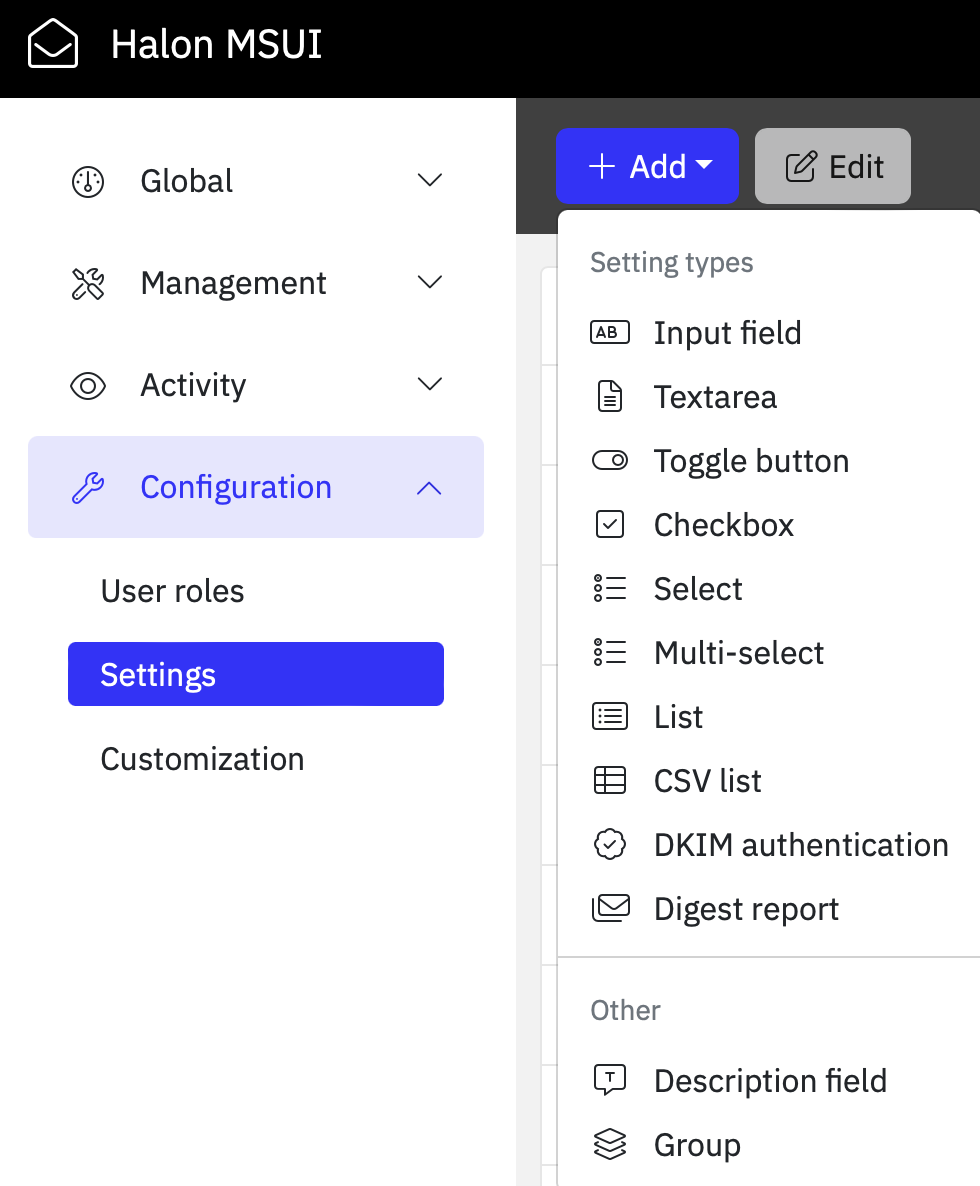
These settings can then be accessed from Halon just like the built-in settings by using the value from the **identifier**
field. The data types when accessed in Halon will depend on the setting type, the **Toggle button** setting
will for example return a Boolean while the **List** setting will return an array containing each value in the list.
```console
[... ,"transport"=>["destination"=>[0=>["hostname"=>"mail.example.com","port"=>25]]], ...]
```
## Digest reports
The digest report feature provides users with the flexibility to receive concise reports containing details about messages
held in their quarantine. The reports include various actions that can be taken, such as releasing the messages to their inbox.
To activate digestreports in MSUI you need to first enable it from the MSUI configuration file (msui.yaml):
```yaml
app:
[...]
digestreport:
enabled: true
smtp:
host: 1.2.3.4
port: 25
auth:
user: "username"
pass: "badpassword"
```
The Digest Report setting, accessible through the UI, offers enhanced customization options for individual domains or users.
This includes the ability to adjust the schedule and personalize both headers and email content according to specific preferences.
## Input validation
In some cases you might want to add input validation to prevent users from accidentally entering an invalid input
for a given setting. This can be done when creating the setting or added later when editing the setting.

## Branding
MSUI also provides the option to personalize the login page and overall user interface with customizable CSS
and some predefined values. This feature allows organizations to imprint their brand, including changing the
logotype, favicon, naming and color theme.
- Preferred formats for the favicon are .ico, .png, or .svg depending on browser support. When using image formats the dimension should be 16x16 pixels or 32x32 pixels, using either 8-bit or 24-bit colors. The file should be uploaded to the following location on the server: `/opt/halon/msui/dist/frontend/favicon.ico`
# Permissions
## User roles
If using the default sql file from the [Initial setup](#install:id1), MSUI will come with a few pre-defined
roles but it is also possible to create custom roles with different permissions depending on your needs.
The user roles define the scope for a user and dictates which settings they are allowed to read/write.
## Inheritance
User permissions are set by domain hierarchy and the user’s role, users of the parent domain will have
full rights to the child domain and all child domains below it.

## Global settings
The global settings can be used to simplify the management of domain-specific configurations.
Rather than manually configuring settings for each new domain, global settings allow you to
define default configurations for a domain which are automatically inherited by its child domains.
For instance, if a particular setting is initially disabled in MSUI, the global setting can override
this and set it to be enabled by default across all affected domains.
```default
+----------------------+
| Global Setting |
+----------------------+
|
+---------------+
| example.com |
+---------------+
/ \
v v
+------------+ +------------+
| example.se | | example.io |
+------------+ +------------+
```
## Two-factor authentication
Two-factor authentication can be enabled for user accounts from the profile page to add an extra layer
of protection to an account, the two-factor authentication in MSUI uses the mobile app called Google Authenticator to generate a rolling 6-digit token
used to verify the account.
# Integration
MSUI offers a lot of options for integrating with Halon which in combination with
the [Halon Scripting Language](https://docs.halon.io/hsl/) (HSL) provides a high degree of flexibility.
The choice of which settings to offer, and using what permission levels, is configurable within the UI. The values
can then be accessed with HSL to make processing decisions for each smtp transaction.
If you’re operating in a memory-constrained environment, it’s worth noting that the `msui-config.yaml` file can be quite large.
In such cases, reviewing the smtpd [memory tuning](https://docs.halon.io/manual/config_tuning.html#memory-tuning) options may help optimize performance.
> **Note**
>
> The sample configuration files located under `/opt/halon/msui/share/examples/hsl` contains sample scripts for inbound and outbound email processing (includes routing, SPF, DMARC, anti-spam, anti-spam and more).
> It uses the `msui-config.yaml` configuration file that is created by the configuration export function in MSUI. It also use the history plugin to send transactional logs to Elasticsearch.
## MSUI Client
The MSUI client should be installed on every Halon node that needs to be able to integrate with MSUI.
Follow the [instructions](https://docs.halon.io/manual/comp_install.html#installation) in our manual to add our package repository and then run the below command.
### Ubuntu
```console
# apt-get install halon-extras-msui-client
```
### RHEL
```console
# yum install halon-extras-msui-client
```
## Settings in MSUI
By using the class provided by the [MSUI client](#integration:mclient) plugin you can fetch various settings from the exported configuration file (see [configuration export](#export) for instructions on how to export the file from MSUI to Halon), for example:
> ```default
> // Managed Service UI
> import { msui } from "extras://msui-client";
> $msui = msui();
>
> $settings = $msui->getDomainSettings("example.com");
>
> if ($settings["dkim"]) {
> $mail->signDKIM($settings["dkim"]["selector"], "example.com", $settings["dkim"]["privatekey"]);
> }
> ```
The scope for a setting can either be set to the entire domain or for individual users, depending on the use-case. This is
determined by the “Availability” option in the UI.
> ```default
> // Managed Service UI
> import { msui } from "extras://msui-client";
> $msui = msui();
>
> $settings = $msui->getUserSettings("user@example.com");
>
> if ($settings["allowlist"]) {
> if (array_includes($connection["remoteip"], $settings["allowlist"])) {
> Accept();
> }
> }
> ```
Invoking the `msui.getUserSettings()` method will get the domain settings by default if there are no excplicit settings set
for the user-scope, in other words the settings on the user level will have priority over the domain
(unless the `msui.getDomainSettings()` method is used instead).
> **Note**
>
> It is recommended to create a HSL script file that can be used to verify data from the exported configuration, such as *msui/test.hsl*.
> This way you can send queries to MSUI and fetch the values of the settings to see if they are behaving as expected
> (Configuration > Settings):
>
> ```default
> // Managed Service UI
> import { msui } from "extras://msui-client";
> $msui = msui();
>
> $recipientdomain = "";
> $recipient = "";
>
> echo $msui->getDomainSettings($recipientdomain);
> echo $msui->getUserSettings($recipient);
> ```
>
> This file can then be run either from the [command line](https://docs.halon.io/manual/plugins_development.html#development)
> or using the [Halon debugger for VSCode](https://docs.halon.io/manual/vscode.html#vscode-debug).
### msui-config.yaml
The configuration file that is exported from MSUI contains all the domains/users as well as their settings, this is what it used by Halon to dynamically make decisions for each transaction.
Below is an example of what part of this file can look like:
```yaml
domains: !Map
example.com:
id: 1
domain: example.com
transport:
destination:
- port: 25
hostname: mx1.example.com
settings:
global: []
users: !Map
user1@example.com:
id: 1
username: user1@example.com
user2@example.com:
id: 2
username: user2@example.com
settings: !Map
[...]
allowlist:
schema:
access_type: all
type: list
default_value: null
option_values: []
merge_default: true
global: {}
domains: !Map
example.com:
users: !Map
user2@example.com:
user:
value:
- value: halon.io
```
> **Note**
>
> This file should not be altered manually, whenever changes are made to `msui.yaml` or any settings are changed in the UI itself the new values are exported so that the configuration in MSUI is always in sync with Halon.
These values are used by the `msui()` class, a lot more examples on how to use these can be found [here](https://github.com/halon-extras/msui-client/tree/main?tab=readme-ov-file#msui).
# API
MSUI includes an extensive API that you can use to integrate MSUI with other systems such as Halon
to manage domains, users, and its settings. It is also possible to let users create an access token
that can be used for API authentication, the access token will then be linked to the user and have the same permissions.
> > **Note**
> >
> > Access tokens has to be created from the web administration when logged in as a user.
The full API reference can be found [here](https://docs.halon.io/msui/api/).
# Changelog
## 1.21.1
Released 2026-11-11
- **Bug** Various bug fixes
- **Pkg** Updated third-party packages
## 1.21.0
Released 2026-09-08
- **Imp** Support including hashed user passwords in config export ([`servers[].app.configexport.includepasswords`](#export:confval-servers-.app.configexport.includepasswords))
- **Imp** Add support for custom basepath ([`servers[].server.basepath`](#config:confval-servers-.server.basepath))
- **Bug** Fix metadata search on history page
- **Pkg** Updated third-party packages
## 1.20.3
Released 2026-05-08
- **Bug** Fixed “Failed to load domain” errors for domain admins of domains with parent domains
## 1.20.2
Released 2026-04-16
- **Pkg** Updated third-party dependencies
## 1.20.1
Released 2026-03-30
- **Bug** Fixed issue with FN reporting when eXpurgate ID is included
- **Bug** Fixed issue with custom views on “Activity -> Statistics” page”
- **Bug** Fixed issue with checkboxes on permissions page
- **Pkg** Updated third-party dependencies
## 1.20.0
Released 2025-12-10
- **Imp** Support env substitutions in YAML config files
- **Imp** Show 2FA information on users list
- **Imp** Add ability for admins to remove 2FA for users
- **Imp** Improved FN/FP reporting page
- **Imp** Add `--totp` flag to password generation command line tool
## 1.19.0
Released 2025-11-07
- **Imp** Added more TLS options for HTTPS listeners such as [`servers[].server.tls.ciphers`](#config:confval-servers-.server.tls.ciphers) and [`servers[].server.tls.protocols.min`](#config:confval-servers-.server.tls.protocols.min)
- **Imp** Added option to send a copy instead of releasing / retrying a quarantined email ([`servers[].server.forwardto[]`](#config:confval-servers-.server.forwardto))
- **Bug** Mutli-select and checkboxes were sometimes not parsed as arrays in the MTA
- **Sec** Updated third-party dependencies
> **Note**
>
> Changes to config schema for config version `1.19`
> : * `servers[].server.certfile` and `servers[].server.keyfile` should now be configured under `servers[].server.tls` instead
## 1.18.2
Released 2025-10-30
- **Bug** Fix issue with being unable to switch between email history and statistics when using web-logui
## 1.18.1
Released 2025-10-02
- **Bug** Fix issue with alias creation during remote authentication
## 1.18.0
Released 2025-08-27
- **Imp** Add support for SMTP authentication sources during login ([`servers[].auth.source.smtp[]`](#config:confval-servers-.auth.source.smtp))
- **Imp** Add support for using access tokens with local users ([`servers[].auth.source.users[].accesstoken`](#config:confval-servers-.auth.source.users-.accesstoken))
- **Imp** Add more options to “add/edit domain” API endpoints
- **Imp** Show history permissions in table on “user roles” pages
- **Imp** Increase limit for how many domains can be fetched from the XHR endpoint at one time
- **Imp** Update translations
- **Imp** Update third-party dependencies
- **Bug** Fix bug with “settings” API endpoint
- **Bug** Support more classifications for reports
- **Bug** Do not allow “suspect” messages to be reported as FP
## 1.17.5
Released 2025-02-27
- **Bug** Fix issue where it was not possible to search for all types of fields in omnibar on “Email tracking” page
- **Bug** Fix issue with case-sensitivity in MSUI digest report
- **Bug** Fix issue where it was not possible to report all types of false positives
- **Bug** Fix issue where spinner was not shown when switching between pages
## 1.17.4
Released 2025-02-05
- **Bug** Disallow FP reports for ID:s that were not blocked
- **Bug** Fix inconsistent recorded completion times for FP/FN reports
- **Bug** Show access information for FP/FN reports under user roles
- **Sec** Upgraded bundled Node to 22.13.1
## 1.17.3
Released 2025-01-20
- **Bug** Fixes to update and backup scripts
## 1.17.2
Released 2025-01-16
- **Bug** Remove check for unsupported database server version due to regression
## 1.17.1
Released 2025-01-15
- **Bug** Fix database upgrade when using MariaDB
- **Bug** Detect if using unsupported database server version during database upgrade
## 1.17.0
Released 2025-01-07
- **New** FN/FP reporting
- **Imp** Support for multiple DKIM keys in order to do rollover
- **Imp** Add more NL translations
- **Imp** Use mysql2 client instead of mysql
- **Bug** Styling fixes in dark mode
- **Bug** Fixed issue with /tmp/halon/ansible folder getting removed during restart
> **Warning**
>
> This version bumps the minimum required version of MySQL server to `8.0`.
## 1.16.2
Released 2024-10-04
- **Bug** Don’t rate limit login attempts when LDAP server is down
- **Bug** Average delivery time showed incorrect values on reporting page
- **Bug** Login page did not show custom translation for input fields
- **Bug** “Last active” value did not update for LDAP users
- **Bug** Paging was not sticky after page reload on domains and users pages
- **Bug** Fix bug with update script
- **Bug** Various style fixes
## 1.16.1
Released 2024-06-10
Frontend
- **Bug** Fixed issue with overflowing custom logos in top navbar
- **Bug** You couldn’t override the color of the top menu button (hamburger icon)
- **Bug** Fixed font color in plain-text preview of email body when using dark mode
## 1.16.0
Released 2024-05-30
Backend
- **Imp** Updated third party dependencies.
- **Bug** Fixed issue with `msui-history.yaml` not validating correctly in some cases.
- **Bug** Fixed missing `remoteptr` field in the `msui-history.yaml` example file.
Frontend
- **New** Added option to set a path to a favicon.
- **Imp** Updated third party dependencies.
- **Bug** Fixed issue where values were not displaying if the header ID contained a dot on the email tracking page.
- **Bug** Fixed issue with error handling whenever the session expires and there are unsaved changes.
- **Bug** Fixed issue with styles not being applied correctly under the email tracking page.
- **Bug** Fixed issue where you were unable to add filters of type long and double.
## 1.15.2
Backend
- **Imp** Updated third party dependency.
Frontend
- **Bug** Fixed issue history and statistics page not using filters on page load.
- **Bug** Fixed issue sync status not showing on dashboard for superusers.
## 1.15.1
Backend
- **Bug** Fixed issue with worker threads not being closed.
Frontend
- **Imp** Updated the username input field is now set to auto focus on login page.
- **Imp** Updated HSL examples files.
- **Imp** Updated configuration example for delivery attempts.
- **Bug** Fixed issue with the initial load of chart data on statistics page.
- **Bug** Fixed issue with dark mode being default theme, it is now set to auto instead.
- **Bug** Fixed settings page not handling empty settings schema correctly.
## 1.15.0
Released 2024-03-07
Important changes
- Updated all configuration and HSL examples for initial configuration. Note that these examples now use the new MSUI client plugin and are not compatible with older examples.
- This release introduces dark mode, any site customization done with style sheets may need to be manually updated.
- We have released new documentation for MSUI.
- The configuration file for MSUI 1.15 has been reworked, changing the “version” property in this file to this version can cause issues, please check out the documentation and examples for the latest configuration structure.
Installation
- Ansible has been added as a requirement when installing MSUI.
- For new installations, a “halon” user and group will be created for the configuration export function in order to save files under the /tmp folder. It will also generate an SSH key-pair under /etc/halon that will be used for authentication.
Backend
- **New** Added new configuration export of domains, users and settings for persistent integration with Halon.
- **Imp** Added configuration option to set session based access levels for local and LDAP users.
- **Imp** Added configuration option to map LDAP groups to specific access levels.
- **Imp** Added configuration option to set the response delay for failed logins.
- **Imp** Added configuration option to force new user’s username to be in lowercase.
- **Imp** Updated configuration validation now uses different schemas based on the “version” property in the configuration file.
- **Imp** Updated audit logging for LDAP authentication now includes more information upon failure.
- **Imp** Updated multiple API endpoints to support FQDN and email addresses instead of IDs.
- **Imp** Updated configuration files and properties for history logging has been moved to msui.yaml and msui-history.yaml instead of logui.yaml and `logui-*.yaml`.
- **Imp** Updated third party dependencies.
- **Bug** Fixed issue with release link on digest reports.
- **Dep** Removed “sync” configuration option for version “1.15”.
- **Dep** Removed “enduser” configuration option for version “1.15”.
Frontend
- **New** Added dark mode.
- **Imp** Added option to resize the columns under the email history page.
- **Imp** Added option to set global filters on the statistics page.
- **Imp** Added option to use different delimiters when exporting history to CSV file.
- **Imp** Added new section for configuration export to the dashboard page.
- **Imp** Added option to list predefined history views in the sidebar menu.
- **Imp** Updated filters for email history and statistics have been reworked to support multiple query types (exact, partial, and regex).
- **Imp** Updated global settings page has been slightly reworked.
- **Imp** Updated filter options for digest reports.
- **Imp** Updated third party dependencies.
- **Dep** Removed legacy top navigations in favour of the side navigation.
- **Dep** Removed the settings grid editor on the domain page.
## 1.14.2
Frontend
- **Bug** Fixed issue with rendering of specific values on preview page.
- **Bug** Fixed sorting on email tracking page.
## 1.14.1
Frontend
- **Imp** Updated preview page now hides the field header if the label is set to an empty string in the configuration file.
- **Bug** Fixed issue with menu button not changing color after navbar color scheme.
- **Bug** Fixed issue with checkbox was incorrectly checked for empty tables.
## 1.14.0
Released 2023-10-10
Installation
- Updated HSL example for EOD inbound and outbound initial configuration.
- Fixed issue with balist.hsl returning incorrect value. The file needs to be manually updated.
Backend
- **Imp** Added new option for custom translations.
- **Imp** Added option to enable or disable access tokens in msui.yaml, default is now disabled.
- **Imp** Added SBOM file to share/sbom.
- **Imp** Updated the server’s start procedure.
- **Imp** Updated the login behaviour and response time.
- **Imp** Updated the date format in digest reports.
- **Imp** Updated access tokens are now available for more user types.
- **Imp** Updated logic for searching on multiple fields.
- **Imp** Fixed audit log now includes client IP address for LDAP authentication.
- **Imp** Updated third party dependencies.
- **Bug** Fixed issue with digest report incorrectly sending out emails to specific users.
- **Dep** Removed custom_locales as an option for custom translations.
Frontend
- **Imp** Added option to perform bulk actions on queued messages.
- **Imp** Added an interactive time series chart to the email tracking page.
- **Imp** Added support to create custom views on the email tracking page.
- **Imp** Added option to export result to a CSV file to the email tracking page.
- **Imp** Added option to have more information on the login page.
- **Imp** Updated option to hide and show specific columns to the domains and users page.
- **Imp** Updated table component for multiple pages.
- **Imp** Updated parsing of certain value types on the preview page.
- **Imp** Updated third party dependencies.
- **Bug** Fixed option to change password was incorrectly showing for specific user types.
- **Bug** Fixed timezone was not applied correctly on the email tracking and statistics page.
- **Bug** Fixed issue with QR code not including the username.
## 1.13.5
Backend
- **Bug** Fixed issue with digest report not handling invalid recipient addresses correctly.
## 1.13.4
Backend
- **Imp** Added new endpoint to fetch the current status of any active or previous digest report tasks.
- **Imp** Updated digest report should now include SMTP response in the log.
- **Bug** Fixed digest report should now terminate any previous tasks before starting a new one.
## 1.13.3
Backend
- **Bug** Fixed validation error when editing settings groups.
- **Bug** Fixed validation warning of the “version” object in msui.yaml.
## 1.13.2
Backend
- **Bug** Fixed issue when filtering transaction logs for usernames containing non-lowercase characters.
## 1.13.1
Backend
- **Imp** Removed constraint when adding aliases to users.
- **Imp** Updated the default layout for statistics.
- **Bug** Fixed issue with links in digest report not working.
Frontend
- **Bug** Fixed issue on preview page with unnecessary error notifications when clicking an action button.
- **Bug** Fixed resizing of grid layout on the dashboard and statistics page when toggling sidebar’s “sticky” mode.
## 1.13.0
Released 2023-04-14
Installation
- The installation will prompt for a database update in order to support new features.
- Updated HSL example for EOD inbound and outbound initial configuration.
- Updated SQL example for initial configuration.
Backend
- **New** Added endpoints for transactions logs.
- **New** Added endpoints for transactions aggregation.
- **New** Added endpoints for message queue actions.
- **New** Added option to send digest reports.
- **Imp** Added filter option to only sync specific domains and/or settings.
- **Imp** Added new permission types for message queue actions.
- **Imp** Updated third party dependencies.
Frontend
- **New** Added history page to view filtered transaction logs.
- **New** Added preview page for transactions, with queue message actions.
- **New** Added statistics page with predefined layouts.
- **New** Added digest report settings type.
- **Imp** Updated roles with new permission types.
- **Imp** Updated third party dependencies.
## 1.12.2
Frontend
- **Bug** Fixed issue that caused duplicate entries in the audit log.
- **Bug** Fixed issue with sidebar not reseting the collapsed state when entering or exiting impersonation.
## 1.12.1
Frontend
- **Bug** Fixed validation issue with list settings.
- **Bug** Fixed SQL example not working after adding i18n to settings groups.
## 1.12.0
Released 2023-03-15
Installation
- The installation will prompt for a database update in order to support new features.
Backend
- **Imp** Added option to automatically generate DKIM key pairs when using /api/v1.
- **Imp** Added new endpoint for updating domains over /api/v1.
- **Imp** Added option to enable i18n on settings groups.
- **Imp** Renamed DKIM API endpoints for /xhr.
- **Imp** Updated validation of API requests for settings.
- **Imp** Updated third party dependencies.
Frontend
- **Imp** Updated option to enable i18n on settings groups.
- **Imp** Updated third party dependencies.
- **Bug** Fixed issue with translation of settings under the user roles page.
- **Bug** Fixed issue with markdown not displaying tables and URLs correctly.
- **Bug** Fixed user form now resets correctly after submitting.
## 1.11.0
Released 2023-01-17
Important changes
- List settings shared between domains and users no longer need to merged in HSL, e.g. $domainsettings[“allowlist”] + $usersettings[“allowlist”] can now be replaced by $usersettings[“allowlist”].
Installation
- The installation will prompt for a database update in order to support new features such as personal access tokens and domain verification.
- API documentation is no longer provided with the package, you will find it here instead.
- Updated HSL script file (msui.hsl) to support new features.
Backend
- **New** Added new API endpoint to create and remove personal access tokens.
- **New** Added new endpoints for domain verification.
- **New** Added support for a new CSV settings type.
- **Imp** Added support to use access token with each request to /xhr API instead a Session ID.
- **Imp** Added option to use fully-qualified domain name instead a domain ID for some /xhr API requests.
- **Imp** Updated configuration schema with options for domain verification.
- **Imp** Updated third-party dependencies.
- **Imp** Updated the configuration will now be validated upon startup.
- **Imp** Updated audit log will now only show the difference when updating lists and CSV settings.
Frontend
- **New** Added option to create and remove personal access tokens.
- **New** Added warnings and information when a domain needs to be verified.
- **New** Added tools to create and manage new CSV settings type.
- **Imp** Added option to enable i18n on settings.
- **Imp** Updated to a new layout, color scheme and a side navbar. Styles (CSS) may need to be updated to match the new default color scheme.
- **Imp** Updated third-party dependencies.
- **Imp** Updated list settings can now be sorted by value, comment, or TTL.
- **Bug** Fixed checkbox settings were not rendered properly.
- **Dep** Removed option to set both navbars to a fixed height, this is now done automatically instead.
## 1.10.2
Backend
- **Bug** Fixed issue with duplicate entries when adding settings via /api.
Frontend
- **Imp** Updated login form to better fit lower resolution screens.
- **Imp** Updated two-factor authentication form.
- **Imp** Updated msui.hsl with a “nocache” option.
- **Bug** Fixed recursive sort of inherited global settings.
- **Bug** Fixed sorting of related domains.
## 1.10.0
Released 2022-05-05
Installation
- The installation will prompt for a database update in order to support new features for global settings. This is required or the service will not start.
- Updated backup and update script will now be skipped if no path to a settings file is provided.
- Updated HSL example script files to support EOD once.
- Updated HSL script file (msui.hsl) to support new features.
Backend
- **New** Added option to create a password reset link for a database user.
- **Imp** Added new API endpoint to add or delete settings on domains and users.
- **Imp** Added new API endpoint for service health check.
- **Imp** Updated nl-nl language file.
- **Imp** Updated custom translation files can now use the settings identifier instead of using the database ID as key.
- **Imp** Updated backend will now try to connect to the database a few times if it fails at startup.
- **Bug** Fixed validation of DKIM selector.
- **Bug** Fixed changes to global settings are now logged as global type instead setting in the audit log.
Frontend
- **New** Added option to generate a password reset link for database users.
- **Imp** Updated domain settings page now includes new sub pages for editing domain properties, users, related domains and audit log.
- **Imp** Updated user settings page now includes new sub pages for editing user properties.
- **Imp** Updated settings page for domains, users and global settings.
- **Imp** Updated form to add new domains and users.
- **Imp** Updated settings validation is now applied on empty values, to allow empty values the regex pattern must now allow that in order to validate.
- **Imp** Updated option to filter by the opposite results for all selected tags.
- **Bug** Fixed prompt to change an expired password was not showing properly.
- **Bug** Fixed DMARC tool displayed the wrong tag name for strict mode.
## 1.9.2
Backend
- **Imp** Fixed issue with global settings not being applied to alias domains when using the /api/v1 endpoint or MSUI sync.
## 1.9.1
Frontend
- **Imp** Updated the time window for TOTP.
- **Imp** Updated passing arguments to web-logui.
- **Imp** Updated database schema example files.
- **Bug** Fixed issue with changing order of settings and groups.
- **Bug** Fixed links that could reset states stored in the query string.
- **Bug** Fixed incorrect sorting of columns with null values.
## 1.9.0
Released 2022-02-09
Installation
- The installation will prompt for a database update in order to support inheritance of global settings. This is required or the service will not start.
- The PHP script for synchronising domains, users and settings has been updated and should now use fewer IOPS during synchronisation.
Backend
- **New** Added option to generate RSA keys.
- **Imp** Added option to convert users to alias when using the “remote” auth strategy.
- **Imp** Added option to enable inheritance of global settings.
- **Imp** Updated schema to support the new “text” and “dkim” settings type.
- **Imp** Updated settings to support force and merge option.
- **Imp** Updated API sync is now more efficient when fetching data from the database.
- **Bug** Fixed too strict permission check when editing global settings.
- **Bug** Fixed XHR responses did not include the error message caused by duplicate database records.
Frontend
- **New** Added new “dkim” settings type with tools for generating private keys, DKIM and DMARC DNS information. The HSL script example has been updated to support DKIM values.
- **New** Added new “text” settings to show more information between other settings.
- **Imp** Added option to show counters on the domain page.
- **Imp** Added option to add tags to multiple domains.
- **Imp** Added option to merge list values that are added through global settings.
- **Imp** Added option to enable inheritance of global settings.
- **Imp** Added option to view and change settings on the domain page.
- **Imp** Updated “Default settings” has been renamed to “Global settings”.
- **Imp** Updated it should now be easier to tell when buttons are enabled or disabled in the navbar.
## 1.8.2
Backend
- **Imp** Updated logging of LDAP authentication.
- **Imp** Updated cookie settings, change SameSite from ‘None’ to ‘Lax’.
- **Bug** Fixed result size could return a incorrect zero value for domains, users and audit log.
Frontend
- **Bug** Fixed missing translation on “Manage roles” page.
- **Bug** Fixed margins between navbar buttons on lower resolutions.
- **Bug** Fixed users could in some cases get stuck on login page after successfully logging in.
## 1.8.1
Frontend
- **Imp** Updated new option to set navbar’s height under “Site customisation”.
- **Imp** Updated navbar’s current location label.
- **Imp** Updated domain and language icon on navbar.
- **Imp** Fixed navbar’s height on lower resolutions.
- **Imp** Fixed navbar’s collapse button on lower resolutions.
- **Imp** Fixed navbar’s now closes after changing page.
- **Bug** Fixed dashboard did not update grid size after changing password.
- **Bug** Fixed domain count on dashboard.
## 1.8.0
Released 2021-11-26
Installation
- The installation will prompt for a database upgrade in order to support “tags”. This is required or the process will not start.
Backend
- **New** Added new XHR endpoints for tags.
- **Bug** Fixed dot domain permission check when adding aliases to a user.
Frontend
- **New** Added new “Manage tags” page.
- **Imp** Added filter by tags on domains and users page.
- **Imp** Added option to add tags to a domain.
- **Imp** Updated navbars are now in a fixed position at the top of the page.
- **Imp** Updated domains and users, moved links from table to a dropdown button in the navbar.
- **Imp** Updated paging and filter states are now saved in the URL’s query string.
- **Imp** Updated login page will now redirect to previous requested URL.
- **Bug** Fixed error message when editing a domain, and the user did not have permission to the domain owner.
## 1.7.0
Released 2021-10-20
Installation
- Added option to perform a database backup when upgrading halon-msui with apt / yum
Backend
- **Imp** Updated error handling for duplicate entries, now returns a specific error message
- **Imp** Updated remote logins, rewrite function can now use {domain} and {localpart} variables to insert the old rewritten value.
- **Imp** Updated roles, it is now allowed to change parent role of an existing role.
Frontend
- **Imp** Added a settings counter for domains and users.
- **Imp** Updated site customisation, now sorts options by type.
- **Imp** Updated settings page, easier to tell which settings are unchanged.
- **Imp** Updated the ‘domain selector’ component.
- **Bug** Fixed site customisation showed an error message after applying changes.
- **Bug** Fixed remote users getting signed in automatically after signing out.
## 1.6.0
Released 2021-09-27
Backend
- **Imp** Added name and secret option to session storage.
- **Imp** Added new checkbox type to settings schema.
- **Imp** Added username rewrite option to remote auth.
- **Imp** Updated audit logging of role xhr requests.
Frontend
- **Imp** Added new Queue and Quarantine nav links to Activity.
- **Imp** Added alias as default search field on users page.
- **Imp** Added new checkbox type to settings editor and settings page.
- **Imp** Updated settings page now disabled input elements based on role permissions.
- **Imp** Fixed layout for smaller resolutions.
## 1.5.0
Released 2021-09-02
Backend
- **Imp** Added redis as an option for session storage, useful when having multiple MSUI’s that should share sessions behind a proxy.
- **Imp** Updated validation and feedback of all XHR request.
Frontend
- **New** Added a new notification component on all pages.
- **Imp** Updated notifications for failed XHR requests.
- **Imp** Updated date format on the users and dashboard page.
- **Imp** Fixed navbar for lower resolutions.
- **Bug** Fixed overlapping navbar text on settings page.
## 1.4.2
Released 2021-06-22
Backend
- **Bug** Fixed filtering by aliases, changed to a subquery.
## 1.4.1
Released 2021-06-21
Backend
- **Bug** Fixed authentication response when using LDAP and 2FA.
Frontend
- **Bug** Fixed “Show aliases” not working properly with localstorage.
- **Bug** Fixed domains and users page, now show/hides edit icon based on user permissions.
## 1.4.0
Released 2021-06-14
Backend
- **Imp** Added SSL options for web-logui integration.
- **Imp** Added more filter options to get domains.
- **Imp** Added compression on requests.
- **Imp** Added new memory session storage, which is now default storage.
- **Imp** Added options to change session storage in the configuration file.
- **Imp** Added API endpoint for user relations (aliases).
- **Imp** Updated remote auth errors.
Frontend
- **Imp** Added filter by aliases on users page.
- **Imp** Updated navbar for smaller screens.
- **Imp** Updated default table columns on domains and users.
- **Imp** Updated domains and users now uses a fixed table layout.
- **Imp** Updated domain and users search filter now updates automatically after a change event.
- **Bug** Fixed changing language resulted in a invalid session on email tracking and statistics page.
## 1.3.0
Released 2021-04-22
Backend
- **Imp** Added support for validation of input and list type setting values.
- **Imp** Updated XHR endpoint for get domains, users and audit log now accepts multiple fields for filtering.
- **Imp** Updated get domains now accepts ‘owner’ and ‘authentication’ as filter option.
- **Imp** Updated audit log now includes source IP on successful login.
- **Imp** Updated alias validation now support dot domains (.example.com).
- **Imp** Fixed session now uses a unique session name per instance.
- **Imp** Fixed session file storage now uses same TTL as session cookie.
Frontend
- **Imp** Added new FontAwesome icons.
- **Imp** Updated user form now has a “disable database login” option.
- **Imp** Updated domain form now support dot domains as alias.
- **Imp** Updated search component to allow multiple fields.
- **Imp** Updated settings page prompts when there are unsaved changes.
- **Imp** Updated settings page now show which settings and tabs that has unsaved changes.
- **Imp** Updated settings page now uses input validation for input and list setting types.